How to Add Compatibility in Firefox: A Practical Guide
Discover practical steps to ensure websites work smoothly in Firefox, using testing, progressive enhancement, and polyfills to maximize cross-browser compatibility.


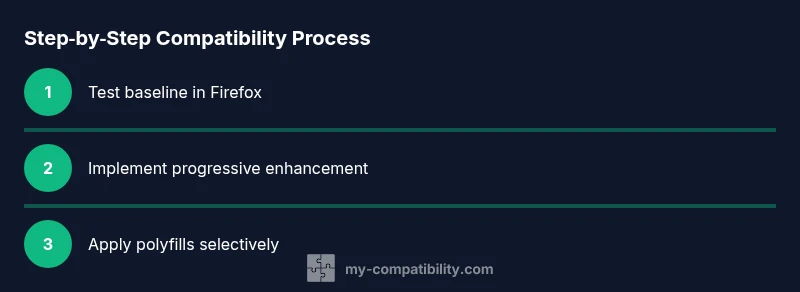
This guide shows you how to add compatibility in Firefox for websites and apps. You'll learn practical steps like cross-version testing, progressive enhancement strategies, polyfills, and debugging with built-in tools. By following these steps, your site should perform consistently in Firefox alongside other major browsers.
Overview: how to add compatibility in firefox
In the world of web development, ensuring a consistent user experience across browsers is essential. When we talk about adding compatibility in firefox, we mean making sure your site or app behaves the same way in Firefox as it does in Chrome, Safari, and Edge. This involves a blend of testing, standards-based development, and strategic fallbacks rather than browser-specific hacks. According to My Compatibility, a solid approach starts with understanding core web standards, implementing progressive enhancement, and validating behavior across Firefox versions. The goal is not to chase every pixel-perfect variation, but to deliver a dependable baseline that degrades gracefully when features aren’t available. Start with clear user requirements, define success criteria for Firefox, and document where differences might occur. This mindset helps teams avoid brittle implementations and makes maintenance easier as Firefox evolves. By focusing on compatibility as an ongoing practice, you reduce risk and improve long‑term reliability for users who rely on Firefox daily.
Why Firefox compatibility matters for developers
Firefox remains a leading browser with a large user base across desktop and mobile platforms. Ensuring compatibility in Firefox is not just about passing tests; it’s about preserving accessibility, performance, and a consistent UX. When sites fail in Firefox, users may encounter layout shifts, unresponsive controls, or missing features that degrade trust and engagement. From a business perspective, addressing Firefox-specific issues reduces bounce rates and increases conversion opportunities. The My Compatibility team emphasizes that compatibility work should be integrated early in the development lifecycle, not tacked on at the end. Regular audits, inclusive design practices, and a culture of cross-browser testing help teams catch issues before they reach production. The result is a smoother experience for all users, regardless of their chosen browser.
Setting up a baseline test plan for Firefox
A solid baseline plan begins with identifying critical features that influence core interactions, such as navigation, forms, and dynamic content. Create test suites that run on Firefox Desktop and Mobile Emulators to capture a broad range of environments. Include commonly used Firefox versions and major platform variants (Windows, macOS, Linux, Android) where feasible. Document any deviations in layout, typography, or behavior and track them over time. Automate as much as possible with simple UI tests that exercise key flows, then supplement with manual exploratory testing in Firefox’s Developer Tools. The plan should specify pass/fail criteria, reproduce steps, and a rollback strategy if a change creates new issues elsewhere. Ongoing testing in real-world scenarios is crucial, because browser behavior evolves with each release.
Progressive enhancement and feature detection in Firefox
Progressive enhancement means building core functionality that works in all browsers, then layering on enhancements for modern engines like Firefox. Feature detection—rather than browser sniffing—helps tailor experiences safely. Instead of assuming a feature exists, check for its presence before using it and provide a safe fallback. Tools like the built-in CSP and the modern JavaScript style guide encourage using feature detection patterns for DOM APIs, CSS features, and network capabilities. In Firefox, you can rely on standard APIs, then gracefully degrade if a feature is unavailable. This approach keeps your code resilient to future Firefox updates while preserving the intended user experience for older environments.
Polyfills and transpilation: bridging gaps in Firefox
Polyfills fill in missing browser features, enabling modern code to run in older Firefox versions. Common polyfill strategies include including core-js for ECMAScript features, regenerator-runtime for async/await, and polyfill.io for on-demand feature coverage. Transpilation with tools like Babel helps convert newer JavaScript syntax into widely supported equivalents. When selecting polyfills, aim for minimal footprint and avoid loading polyfills for features already present in Firefox. By coupling polyfills with proper feature detection, you can keep bundles lean while maximizing compatibility. Always test after adding a polyfill to verify that it doesn’t disrupt existing behavior or performance.
CSS compatibility: layout, typography, and rendering in Firefox
Firefox’s CSS support has matured, but subtle differences can still affect layouts. Use modern layout techniques such as Flexbox and CSS Grid with fallbacks where needed. Prefer @supports queries to apply Firefox-specific adjustments without breaking other engines. Normalize fonts and box models to reduce rendering inconsistencies across platforms. When it comes to typography, test font rendering, subpixel antialiasing, and line-heights in Firefox to ensure legibility. Responsive design should rely on viewport units and relative sizing rather than fixed values. By embracing standards-based CSS and feature queries, you minimize Firefox-specific hacks while achieving consistent visuals.
JavaScript strategies for cross-browser compatibility in Firefox
Adopt robust JavaScript patterns that work across browsers, including strict mode, modules, and well-scoped variables. Use try/catch blocks to handle optional APIs gracefully, and prefer feature detection to user-agent sniffing. Avoid deprecated APIs and shims that duplicate functionality; instead, provide transparent fallbacks. Modular code and clear separation of concerns simplify debugging in Firefox DevTools. Document each API that your app uses, noting Firefox-specific quirks and the version where a behavior changed. Regularly refactor to remove duplication and align with modern standards, keeping behavior predictable for Firefox users.
Firefox developer tools: debugging and optimization tips
Firefox Developer Tools are a powerful ally for compatibility work. Use the Inspector to verify DOM structure and CSS rendering; the Console for runtime errors, and the Network panel to diagnose resource loading issues. The Performance tab helps you identify slow scripts and rendering bottlenecks unique to Firefox’s engine. Responsive Design Mode lets you simulate different device sizes and user environments. Regex-based searches within the console can help pinpoint problems across large codebases. Familiarize yourself with keyboard shortcuts and customizations to speed up debugging sessions. Regular use of these tools will reveal Firefox-specific quirks early in the development cycle.
A practical example: improving a small site for Firefox compatibility
Imagine a small landing page with a navigation menu, a dynamic hero section, and a form. Start by testing the page in Firefox to observe any misalignments or script failures. Add a progressive enhancement layer by implementing a simple feature-detection check for high-DPI images and serving a fallback image when needed. If a script relies on a newer DOM API, provide a safe fallback or polyfill. Adjust CSS with a @supports query to ensure the layout remains stable on Firefox. Finally, run the automated tests and perform manual checks in Firefox across desktop and mobile to confirm consistency. This step-by-step approach demonstrates how to translate theory into real-world improvements.
Maintenance, documentation, and long-term practices for Firefox compatibility
Compatibility is an ongoing practice, not a one-off task. Maintain a living documentation page that outlines supported Firefox versions, known issues, and implemented workarounds. Establish a release checklist that includes Firefox-specific tests, performance benchmarks, and accessibility checks. Schedule periodic audits aligned with Firefox version cycles and major web platform updates. Encourage a culture of continuous learning, so developers stay ahead of changes in Firefox and related technologies. A proactive maintenance plan minimizes surprises and sustains a high-quality user experience over time.
Tools & Materials
- Firefox browser (latest stable)(Essential for testing and devTools)
- Code editor (e.g., VS Code)(For editing HTML/CSS/JS and polyfill configs)
- Polyfill library (core-js, polyfill.io)(Use only if Firefox version lacks features)
- Automated testing tool (e.g., Selenium/WebDriver)(Helps automate cross-version checks)
- CSS reset/normalize stylesheet(Reduces browser-specific rendering differences)
- Access to a staging environment(Test changes before production)
Steps
Estimated time: 60-120 minutes
- 1
Define Firefox-specific compatibility goals
List the critical features your site relies on and set success criteria for Firefox across devices and versions. This baseline informs testing and polyfill decisions.
Tip: Document expected behaviors for Firefox early in the project. - 2
Create a baseline Firefox test plan
Develop a test suite that covers navigation, forms, dynamic content, and accessibility in Firefox. Include both desktop and mobile viewpoints where possible.
Tip: Automate repetitive checks to save time. - 3
Implement progressive enhancement
Build core features that work in all browsers, then progressively add enhancements when Firefox supports them. Always provide safe fallbacks.
Tip: Prioritize core flows first to avoid dead-ends in Firefox. - 4
Add feature detection checks
Replace browser checks with feature detection for APIs your site uses. Avoid hard dependencies on Firefox-specific behavior.
Tip: Keep detection concise and well-documented. - 5
Integrate polyfills where needed
Incorporate polyfills selectively for features missing in older Firefox versions, and remove them once not needed.
Tip: Test with and without polyfills to confirm necessity. - 6
Adjust CSS with modern techniques
Use CSS Grid/Flexbox with @supports to apply Firefox-safe fallbacks. Validate typography and layout across viewports.
Tip: Avoid relying on vendor prefixes; prefer standards where possible. - 7
Test and debug with Firefox DevTools
Use Inspector, Console, Network, and Performance tools to locate and fix Firefox-specific issues.
Tip: Create bookmarks for common Firefox debugging tasks. - 8
Validate across Firefox versions
Run tests on multiple Firefox versions or employ emulation to ensure consistent behavior across releases.
Tip: Note any regression and tie fixes to specific Firefox updates.
Questions & Answers
What is the best approach to achieve Firefox compatibility?
Adopt progressive enhancement, robust feature detection, and polyfills as needed. Avoid browser hacks and ensure core functionality works in all browsers.
The best approach is progressive enhancement with feature detection; polyfills as needed, avoiding hacks.
Should I rely on user-agent sniffing to tweak Firefox behavior?
No. User-agent sniffing is brittle and breaks with updates. Prefer feature detection and standards-based fallbacks.
Avoid user-agent sniffing; use feature checks and progressive enhancement instead.
Which polyfills are essential for Firefox compatibility?
Polyfills for ES features and async/await are common; consider core-js and polyfill.io based on your target Firefox versions.
Polyfills like core-js help backfill missing features in older Firefox versions.
How do I test Firefox compatibility effectively?
Use a mix of automated tests and manual testing across Firefox versions, devices, and screen sizes. Leverage Firefox DevTools for debugging.
Test with automated checks and hands-on testing in Firefox, using DevTools for debugging.
Is it okay to implement Firefox-specific CSS hacks?
Generally avoid hacks; prefer standards-based solutions and @supports to isolate Firefox-specific adjustments.
Avoid hacks; use standards-based approaches and @supports where possible.
Watch Video
Highlights
- Test early and often in Firefox across versions
- Favor progressive enhancement and feature detection
- Use polyfills judiciously and remove them when unnecessary
- Rely on standards-based CSS/JS for long-term compatibility
- Maintain thorough documentation and ongoing maintenance