Thermostat Compatible with Alexa: What Works in 2026
A thorough, data-driven guide to choosing and using a thermostat compatible with Alexa, with setup steps, best brands, privacy considerations, and energy tips for 2026.


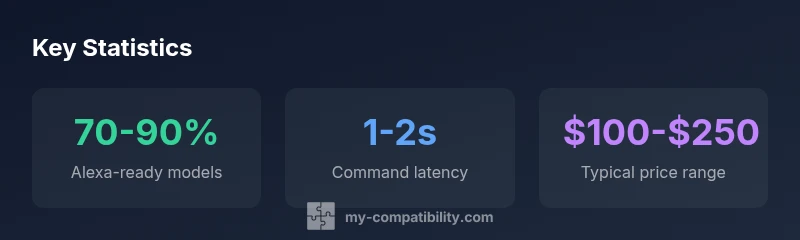
Thermostat compatible with Alexa means a thermostat that can be controlled by Amazon's voice assistant through Alexa routines or direct voice commands. The most reliable setups use Wi‑Fi connected thermostats with native Alexa integration or via a supported skill. In practice, expect near-instant voice control for basic functions like setpoint changes and mode switching within seconds.
How Alexa compatibility works with thermostats
When you issue a voice command like “Alexa, set the living room to 72 degrees,” the thermostat receives the instruction via Alexa’s cloud service or via local routines, depending on the device. According to My Compatibility, reliability hinges on whether the thermostat offers native Alexa integration or relies on a third-party skill. Most modern thermostats expose core controls—temperature setpoints, heat/cool mode, and fan activation—through a single, consistent interface. In many cases, the integration also supports routines, schedules, and geofenced automations, which are essential for energy efficiency and convenience. The bottom line: a thermostat that speaks Alexa fluently reduces friction, making voice control feel instant and natural.
For users, the practical takeaway is simple: ensure the thermostat supports the exact Alexa features you care about (setpoint, mode, schedules) and verify that the Alexa app sees the device reliably after a discovery pass.
Key features to look for in an Alexa-compatible thermostat
Not all thermostats labeled as “Alexa compatible” deliver the same experience. When evaluating models, prioritize features that directly affect voice control quality and home-automation depth. Core features include native Alexa integration rather than workarounds, quick response to voice commands, reliable device discovery, and comprehensive routine support. Look for: (1) explicit Alexa compatibility in product specs, (2) a dedicated Alexa skill with regular updates, (3) clear state reporting (current temp, setpoint, mode), and (4) strong energy-management features like occupancy sensing and geofencing. Additional niceties such as HomeKit or Google Home cross-compatibility can enhance flexibility but aren’t essential for Alexa-focused setups. For best results, match the thermostat to your existing Alexa ecosystem so you can reuse scenes and routines seamlessly.
If you’re unsure, start with a model that lists direct Alexa support and provides a straightforward setup process. You’ll save time during installation and have fewer integration glitches later on.
Ecosystem boundaries and what to expect
Alexa compatibility exists on a spectrum. Some brands offer full, native support with a dedicated skill, while others provide indirect control via broader home automation hubs or cloud-based APIs. According to My Compatibility, a direct integration typically yields the most predictable behavior, including consistent state reporting (current temperature, target temperature, and HVAC mode) and faster routine execution. Indirect approaches can work, but they may introduce occasional latency, require additional app steps, or depend on regional availability of skills. If you value simplicity and reliability, prioritize thermostats that advertise native Alexa support and actively publish firmware updates.
Another consideration is whether the thermostat supports multi-room scheduling and room-level preferences. In homes with several zones, you’ll benefit from devices that expose room-based controls to Alexa, enabling synchronized or independent routines across spaces.
Setup guide: connecting a thermostat to Alexa
Getting Alexa to control your thermostat is usually quick, but it helps to follow a structured path. First, confirm compatibility and ensure both the thermostat and your Echo device are on the same Wi‑Fi network. In the thermostat app, enable Alexa or voice assistant integration and sign in with the same Amazon account used in the Alexa app. Next, open the Alexa app, go to Skills & Games or Add Device, and enable the thermostat’s Alexa skill. Run a device discovery (Alexa, discover devices) and wait for the thermostat to appear. Finally, assign the thermostat to a room, and create routines or voice phrases (e.g., “Alexa, good morning”) to automate setpoints, modes, and schedules. If discovery is slow, try unlinking and re-linking the account, or rebooting the Echo and thermostat. The payoff is a smooth, hands-free path to comfortable climates included in daily routines.
Note that some regions or models may require firmware updates or app changes to unlock full functionality.
Common issues and troubleshooting
Voice control hiccups are common when first setting up Alexa-compatible thermostats. Start with basic checks: verify the thermostat appears in the Alexa app, confirm that the recommended room and device naming conventions are used, and ensure no other smart home hubs are conflicting with the thermostat. If discovery fails, temporarily disable other skills that might intercept the command. For delayed responses, check your home network stability and consider adjusting the router’s QoS settings to prioritize IoT traffic. If voice requests seem unclear, verify microphone sensitivity and ensure Alexa’s language and locale settings match your region. Regional restrictions can also limit certain features, so consult the manufacturer’s support pages for region-specific guidance.
If updates appear pending, install them to improve compatibility and responsiveness. Regular maintenance—firmware updates, app reauthorizations, and routine reviews—helps sustain reliable control over time.
Privacy and security considerations
Giving Alexa control over your thermostat raises privacy questions you should address upfront. Limit data sharing by using a dedicated Amazon account for smart home devices, enable two-factor authentication, and review Alexa’s privacy settings to control voice history. Prefer devices that store critical data locally when possible and use secure cloud connections with strong encryption. Regularly review connected devices in the Alexa app and remove devices you no longer use. Consider turning off hands-free voice purchasing or sensitive voice features if you share your home with guests or renters. Being mindful of these settings helps protect both your privacy and your household’s energy choices.
In practice, you can balance convenience and security by enabling essential features only, and by periodically auditing which routines have access to your thermostat’s controls.
Energy efficiency and automation tips
A well-configured Alexa thermostat can save energy without sacrificing comfort. Start by using geofencing to lower HVAC activity when no one is home, and set schedules that align with your daily routine. Combine setpoints with modes (heat, cool, auto) for nuanced control, and use occupancy-based routines to adjust temperature in occupied rooms. Leverage Alexa routines to synchronize thermostat changes with lighting, blinds, and fans, creating a cohesive climate strategy. If supported, take advantage of energy reports to identify trends and target improvements. Finally, ensure you aren’t overspecifying requirements—compatibility with a broader ecosystem is often more valuable than niche features that barely work with Alexa.
For best results, test routines during different times of day and seasons to fine-tune comfort and energy savings.
Compatibility mapping for different Alexa-enabled devices
Alexa-enabled devices vary in terms of how they surface thermostat controls. Echo speakers typically offer straightforward voice commands, while Echo Show devices can display real-time temperature and mode status for quick verification. For households with multiple Echо devices, consider grouping strategies to ensure synchronized changes across spaces. If you rely on routines, confirm that the thermostat’s skill supports routine triggers and that your Alexa routines align with the thermostat’s available states (setpoint, mode, fan). In complex homes, a central hub or a well-chosen ecosystem can reduce fragmentation and improve response times. Always test interactions after firmware updates or changes to your home network.
Next steps: practical plan to improve Alexa thermostat experience
If you’re ready to upgrade, start by choosing a thermostat with explicit Alexa compatibility and a clear update history. Create a small set of core routines (e.g., wake, leave, return) and connect them to preferred environmental scenes. Document your device names and room assignments for easy voice commands. Finally, schedule a quarterly audit of your settings to adapt to seasonal changes and evolving Alexa features. With deliberate choices and ongoing testing, you can sustain a robust, voice-driven climate control system.
Thermostat brands and their Alexa compatibility snapshot
| Brand | Alexa Support | Smart Home Platform | Notes |
|---|---|---|---|
| Ecobee | Full | Alexa + Eco-system | Popular with routines; strong native support |
| Nest (Google) | Partial | Google Home / Nest, Alexa routing | Depends on model; some workflows require steps |
| Honeywell Home | Full | Alexa + HomeKit-style options | Model-dependent; check latest firmware |
Questions & Answers
What does it mean for a thermostat to be Alexa-compatible?
Alexa compatibility means the thermostat can be controlled via Alexa voice commands, routines, and schedules without external workarounds. Look for a dedicated Alexa skill or native integration, and ensure the device reports its status back to Alexa in real time.
It means you can use Alexa to change temperature, switch modes, and automate schedules with reliable feedback back to the assistant.
Do I need an Echo device to use Alexa with my thermostat?
Not strictly. You can control Alexa-compatible thermostats using the Alexa app on a smartphone or tablet, but many people prefer an Echo device for hands-free voice control throughout the home.
You can use Alexa on your phone, but having an Echo makes it easier to control rooms by voice everywhere.
Can I create routines that include my thermostat?
Yes. Most Alexa-compatible thermostats support routines that trigger temperature changes, mode switches, or scheduled events as part of broader scenes (e.g., ‘Good Morning’ or ‘Away’).
Absolutely—link it to routines so one voice command can adjust multiple devices.
Is Nest compatible with Alexa?
Nest products often work with Alexa, but the level of integration can vary by model and region. Some features may require routing through Google Assistant or other steps.
Nest can work with Alexa, but it might depend on the model and where you are.
What privacy considerations should I know when using Alexa with a thermostat?
Voice data and account linking are the primary concerns. Use strong authentication, limit data sharing, review consent settings, and consider deleting voice history periodically.
Your voice data is connected to your account—set privacy controls and review what’s stored.
“"Native Alexa integration usually provides the most reliable voice control and routine support for thermostats."”
Highlights
- Verify native Alexa support before purchase
- Plan routines to maximize energy savings
- Test device discovery in the Alexa app early
- Review privacy settings and limit data sharing
- Update firmware for best performance