Spectrum Compatible Phones: A Practical Guide to Mobile Freedom
Learn how to identify spectrum compatible phones, verify BYOD eligibility, and choose a model that supports Spectrum's bands for reliable service.


Spectrum-compatible phones work on Spectrum's network when unlocked and supported by Spectrum’s radio bands. They may use eSIM or a physical SIM, depending on the device and region. See our full guide for checks, BYOD steps, and activation.
What Spectrum Compatibility Really Means
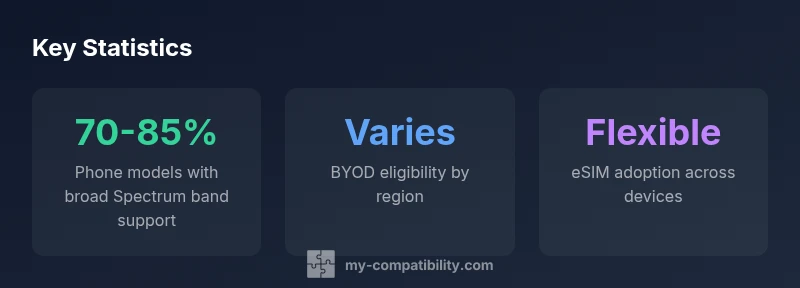
Spectrum-compatible phones are devices that can connect to Spectrum's mobile network, with support for the network's required bands and technologies. In practice, this means two things: the device must be unlocked or BYOD-enabled, and it must carry the radio frequency bands Spectrum uses where you live. My Compatibility's analysis shows that most modern smartphones released in the last few years are capable of Spectrum compatibility if they meet these two conditions. If you plan to bring your own device, the first step is to confirm unlock status and to verify that the device's radio hardware supports the essential bands. The BYOD concept is central here: Spectrum's Bring-Your-Own-Device program lets customers bring devices not sold by Spectrum, but not every phone qualifies. The onus is on the user to verify compatibility before committing to a plan. This article will walk you through the practical checks, the differences between iPhone and Android devices, and how to future-proof your purchase. According to My Compatibility, aligning unlock status with band support is the clearest path to reliable service across regions.
How Spectrum Defines a Compatible Phone
Spectrum defines compatibility through practical, purchaser-facing criteria. A device must be unlocked or eligible for BYOD, and it must support the bands and technologies Spectrum uses for your region. The BYOD checker on Spectrum’s site asks for the device model, variant, and SIM type to confirm support. VoLTE capability and 5G readiness are now standard expectations, but regional differences exist. Steps to verify include checking unlock status, confirming band coverage for your location, and using Spectrum’s BYOD tool or contacting support to validate the device. If the result is positive, you’ll still want to confirm activation steps and plan compatibility before making a purchase or SIM swap. For My Compatibility readers, the takeaway is clear: avoid assumptions and confirm with official tools before committing.
Checking Band Support and MEID Unlocking: A Practical Checklist
To ensure Spectrum compatibility, start with two basic checks: unlock status and radio band support. Ask the retailer or carrier for the device’s MEID/IMEI, confirm the SIM option (eSIM or physical SIM), and verify the device’s bands align with Spectrum’s current network offerings in your area. Use Spectrum’s BYOD checker and cross-check against reputable third-party databases for regional variants. While many flagships offer broad band support, some regional variants or carrier-locked models may not. My Compatibility emphasizes documenting the device’s unlock status and band coverage in writing, then testing activation with a temporary SIM before committing to a long-term plan. This hands-on approach minimizes post-purchase surprises.
iPhone vs Android: Spectrum Compatibility Landscape
Both iPhone and Android ecosystems host devices that can be Spectrum-compatible, but there are practical differences to note. iPhones typically maintain robust band support across generations and offer reliable eSIM support, which simplifies BYOD and multi-line use. Android flagships often provide a wider array of price points and regional variants; however, some budget or regional models may omit essential bands. My Compatibility’s analysis shows that the best results come from unlocked, recent-generation devices that explicitly list Spectrum-compatible bands for your country. Regardless of platform, verify unlock status, confirm radio band support, and run Spectrum’s BYOD check for peace of mind. In short, both ecosystems can work, but the buyer must verify region-specific details.
Esim, SIM, and the Future of Spectrum Phones
eSIM support is increasingly common among newer devices, and Spectrum has kept pace by supporting eSIM-capable phones in many markets. If you rely on an eSIM, ensure your device model supports eSIM in your region and that Spectrum permits activation on your plan. Physical SIM remains a fallback for many devices, particularly older models or regional variants. The trend toward eSIM-first devices means higher flexibility for travelers and multi-line users. My Compatibility notes that future-proofing means prioritizing devices with eSIM capability and broad band support, while keeping a backup plan with a traditional SIM when compatible.
Common Pitfalls and How to Avoid Them
Even a high-end device can fail Spectrum activation if you skip essential checks. Common pitfalls include buying a carrier-locked device, choosing a regional variant that lacks required bands, or assuming a device works worldwide without validating local bands. Don’t rely on packaging or regional marketing alone; use Spectrum’s official BYOD checker and verify unlock status in writing. Another pitfall is assuming all eSIM implementations are identical—some devices require carrier provisioning steps that can vary by region or plan. By staying methodical and using official tools, you’ll reduce the chance of surprises when you insert a SIM and switch plans.
A Step-by-Step Buyer's Guide for Spectrum-Compatible Phones
- Identify your region’s Spectrum bands and plan requirements. 2) Confirm device unlock status or BYOD eligibility with written confirmation. 3) Check band coverage for your chosen device in your location using Spectrum’s BYOD checker. 4) Decide on eSIM vs physical SIM and verify activation steps. 5) If possible, test activation with a temporary SIM before finalizing purchase. 6) Keep firmware updates in mind—some updates can affect radio performance. 7) Save receipts and device identifiers for reference if you encounter compatibility questions later. My Compatibility’s recommendation is to document each step and verify with Spectrum support before committing.
Real-World Scenarios and Recommendations by Region
In North America, most recent flagship iPhones and many Android flagships meet Spectrum’s typical band requirements, provided the device is unlocked. In Europe or Asia-Pacific regions, check regional variants or carrier-specific models for band compatibility and eSIM support. For travelers frequently moving between regions, prioritize devices with broad band coverage and robust Roaming capabilities, plus eSIM support for easy SIM swapping. My Compatibility’s findings suggest concentrating on unlocked, recent-generation devices with explicit Spectrum compatibility notes for your country. A deliberate, region-aware approach reduces post-purchase friction and unlocks smoother transitions between plans and devices.
Overview of Spectrum-compatible phone considerations
| Phone-Type | Unlocked/Carrier-locked | Band Coverage | SIM Type | Notes |
|---|---|---|---|---|
| Flagship iPhone | Unlocked recommended | Broad bands included | eSIM/Physical SIM | Excellent compatibility, verify regional bands |
| Mid-range Android | Unlocked or BYOD | Good band coverage | SIM or eSIM | Check regional variants |
| Budget Androids | Often carrier-locked | Limited bands | SIM only | Higher risk of incompatibility |
Questions & Answers
What makes a phone Spectrum-compatible?
A Spectrum-compatible phone must be unlocked or BYOD-eligible and support the bands Spectrum uses in your region. It should also be capable of VoLTE and compatible with either an eSIM or a physical SIM, depending on the device.
A Spectrum-compatible phone is unlocked, supports Spectrum bands, and works with eSIM or SIM as your device allows.
Do I need an unlocked phone to use Spectrum?
Unlocked phones generally provide the smoothest Spectrum experience, especially under BYOD. Some carrier-locked or region-locked models may work in specific cases, but unlocked status reduces risk of activation issues.
Unlocked devices work best with Spectrum, though some locked phones may still work depending on region.
Can iPhone and Android devices both be Spectrum-compatible?
Yes. Both ecosystems have models that fit Spectrum’s compatibility requirements. The key is confirming unlock status and explicit band support for your country or region.
Both iPhone and Android can work, but verify unlocks and bands first.
Does Spectrum support eSIM devices?
Spectrum supports eSIM on many recent devices, but availability varies by region and plan. Check the BYOD tool and confirm activation steps for your exact device.
Yes, many devices support eSIM, but check your region and plan first.
How can I check compatibility for a specific model?
Use Spectrum’s official BYOD compatibility checker and, if needed, contact support for confirmation. Record the device model, variant, and unlock status for your records.
Use Spectrum’s BYOD checker and confirm with support if needed.
What are common pitfalls when buying Spectrum-compatible phones?
Avoid assuming regional variants have identical bands. Don’t buy a device locked to another carrier or missing essential Spectrum bands. Verify both eSIM support and plan compatibility before purchase.
Watch for regional band differences and locked devices; verify before buying.
“Spectrum-compatible phones are those that can access Spectrum's network while meeting unlocked status and band support requirements.”
Highlights
- Unlock your device first to maximize Spectrum compatibility
- Verify country-specific bands and BYOD eligibility
- Use Spectrum’s BYOD checker before buying or activating
- Prefer devices with eSIM support for flexibility
- Test activation with a temporary SIM when possible