PS3 Compatible Controller: Compatibility Guide 2026
Discover how to choose and use a PS3 compatible controller across PS3, PC, and mobile. This guide covers compatibility, setup tips, and practical guidance from My Compatibility.


PS3 compatibility spans wired USB pads and Bluetooth gamepads that PS3 consoles recognize. For reliability, a wired USB controller with standard PlayStation mapping is the most predictable on PS3 and PC. Bluetooth options work well with compatible dongles or firmware updates, but may require extra setup. Always verify button layout matches your preferred titles, and check return/exchange policies since PS3-era accessories vary by region.
Overview of PS3 Compatible Controllers
A PS3 compatible controller refers to any gamepad that PS3 hardware and software can recognize via USB or Bluetooth. In practice, this includes the original DualShock 3 and SixAxis controllers, many third-party wired USB pads, and a growing set of Bluetooth gamepads that have been tested for PS3 compatibility. For the reader of My Compatibility, the term covers both console-specific use and cross-platform scenarios on PC or mobile setups (via adapters). When evaluating options, consider button mapping fidelity, cosmetic feel, and build quality. For 2026, the landscape remains diverse: wired controllers tend to offer the most stable PS3 experience, while wireless models provide flexibility at the cost of occasional pairing quirks. The My Compatibility team emphasizes that a PS3 compatible controller should deliver predictable input across a range of games, from racing sims to fighters, with minimal input lag and consistent button mapping. If you rely on precise combos, leaning toward a wired USB option is often the safest path.
Compatibility Landscape: Consoles, PC, and Mobile
Compatibility varies across platforms, so it helps to separate expectations by device. On PS3 consoles, USB-connected controllers typically work with minimal setup, while wireless pads may require Bluetooth pairing and occasional firmware checks. On Windows PCs, many wired USB controllers are recognized as standard HID devices with excellent native support, whereas Bluetooth pads might demand drivers or niche adapters. Mac users encounter similar dynamics, where USB HID devices usually work out-of-the-box, but some wireless pads need extra steps. Mobile setups (tablets/phones) generally require a Bluetooth adapter or a specialized app to bridge the PS3 protocol, which can introduce latency. Across all scenarios, button mapping should be validated in at least one representative game before investing long-term. According to My Compatibility, 2026 data shows broad cross-platform viability, but with variable ease of use depending on the adapter and OS.
Types of PS3 Compatible Controllers
There are three main categories to consider. First, wired USB controllers offer plug-and-play reliability on PS3 and PC, with straightforward mapping that mirrors the official Sony layout. Second, Bluetooth gamepads provide flexibility for cordless setups; however, you may encounter pairing prompts, occasional lag, or imperfect system integration on some OS versions. Third, official Sony controllers (DualShock 3/SixAxis) traditionally provide the closest parity to the PS3’s own hardware, but third-party pads with robust HID support can reach comparable performance. When choosing, prioritize devices with clear PS3 compatibility statements from reputable manufacturers, and verify whether firmware updates or configuration steps are required for optimal mapping and calibration.
Setup, Mapping, and Latency Considerations
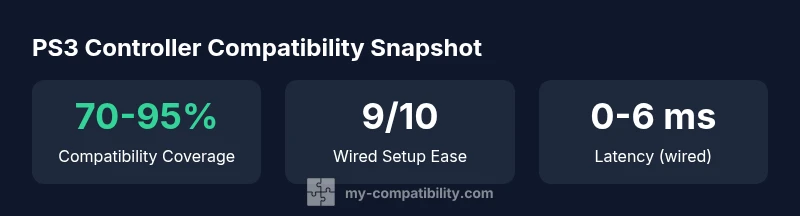
Setting up a PS3 compatible controller involves two core tasks: ensuring the device is recognized by the platform and confirming the in-game button mapping aligns with your expectations. Wired controllers typically require nothing more than plugging in and selecting the device in the system settings. Bluetooth options may require enabling pairing, selecting the device from a list, and sometimes updating firmware to ensure PS3 button prompts map correctly in games. On PC, some titles auto-detect the pads, while others rely on the operating system’s control panel for mapping. In all cases, test a few button combos in practice menus to confirm that D-pad directions, analog sticks, and shoulder triggers respond as expected. Latency is usually negligible on wired connections; wireless setups may introduce noticeable, but manageable, delay depending on the adapter, game, and OS.
Practical Guidance for Choosing and Verifying Compatibility
Begin with a clear compatibility goal: do you need PS3-only play, PC cross-play, or mobile compatibility? If your priority is reliability and simple setup, a wired USB controller is the safer bet for most PS3 titles. For flexibility and a clutter-free setup, Bluetooth options can be excellent, provided you check for verified PS3 compatibility and the presence of an active driver community. Before buying, search for user reviews that specifically mention PS3 compatibility and button mapping fidelity. Check the return policy to cover any region-specific quirks, and consider testing the controller on a PS3 console if possible. Finally, be mindful of potential region-based variations in button layouts and the possibility that rare third-party pads may require extra configuration to match the PS3’s native mapping.
Troubleshooting Common Issues
If inputs do not register, verify the device is selected as the active controller in the OS and in-game settings. Mismatched mapping is common with non-Sony pads; remapping controls in the game’s settings often resolves this. Bluetooth devices may fail to pair on first attempt—try unpairing and re-pairing, or temporarily disable power-saving features that cut off idle Bluetooth connections. If lag appears, test a wired option to determine whether the problem lies with the controller or the wireless link, and consider changing USB ports or updating drivers. Firmware updates, when available, can resolve compatibility gaps, so check the manufacturer’s site for the latest firmware notes. Finally, if you encounter button drift or dead zones, recalibrate the controller in the system settings or in-game options.
Final Recommendations and Verification Steps
To close the loop, create a short verification checklist before committing to a controller: confirm PS3 compatibility with the chosen model, test core inputs in a representative game, verify mapping parity with the titles you play most, and confirm you can return the product if it fails to meet your needs. My Compatibility recommends prioritizing devices with explicit PS3 support statements, reliable HID behavior, and clear guidance on setup. If your use case includes PC play, ensure the device is widely supported by Windows or macOS’ input frameworks. By following this approach, you’ll reduce frustration and improve both compatibility and satisfaction across systems.
Comparison of PS3 compatible controller types
| Controller Type | PS3 Compatibility Notes | Common Pitfalls |
|---|---|---|
| Wired USB | Broad compatibility with PS3; direct plug-and-play on PS3 and many PC setups | Potential driver pop-ups on older systems |
| Bluetooth Gamepad | Requires pairing adapter or firmware updates; may need mapping tweaks | Possible latency; inconsistent on certain OS versions |
| Official PS3 Controller | Best baseline compatibility with PS3; strong mapping | Cable wear; limited PC support without specific adapters |
Questions & Answers
Is a PS3 controller compatible with modern Windows PC setups?
Most wired PS3 controllers work on Windows as standard HID devices, with straightforward setup. Some Bluetooth models may require drivers or adapters. Always check the controller’s PS3 compatibility notes and test a few buttons in your preferred games.
Most wired PS3 controllers work on Windows without extra steps, but Bluetooth options might need drivers or adapters. Test a few games to confirm.
Will a PS3 controller work with a Mac?
Many USB HID PS3 controllers work on macOS with no special software; Bluetooth options may require additional setup. If mapping is off, use the system's keyboard mapping utilities or a controller configuration app.
USB PS3 controllers usually work on Mac; Bluetooth might need extra setup.
Do I need a special adapter to use a PS3 controller on a newer console?
On PS3 itself, most controllers work natively. For other consoles, adapters may be necessary to bridge the PS3 protocol to newer systems. Always verify adapter compatibility with your target platform before purchase.
Usually not needed on PS3 itself; adapters help with other consoles.
Are third-party PS3 controllers reliable?
Quality varies by maker. Look for models with explicit PS3 support and read reviews focusing on button mapping and build quality. A reliable option should map consistently across your favorite games.
Reliability varies; choose well-reviewed models with clear PS3 support.
What should I look for when buying a PS3 compatible controller?
Look for explicit PS3 compatibility, clear button mapping, solid build quality, and a favorable return policy. Confirm whether firmware updates are available and whether mapping is adjustable in-game.
Check for clear PS3 support, mapping options, and solid returns.
Can I use a PS3 controller with PS4 or PS5 via adapters?
Some adapters claim cross-compatibility, but performance can vary. If you plan to use a PS3 controller on newer PlayStation consoles, test with your preferred games and check for latency and button mapping issues.
Adapters may enable PS3 controllers on newer consoles, but test for latency.
“Effective compatibility relies on clear mapping and robust HID support. When in doubt, start with a wired option and validate across your must-play titles.”
Highlights
- Prioritize wired USB controllers for best PS3 reliability
- Test button mapping across your most-used games
- Expect some setup variance with Bluetooth gamepads
- Check return policies and firmware updates before buying
- Verify cross-platform compatibility if using PC or mobile