Phones Compatible with Safelink Wireless: A Practical Guide
Discover which phones work with Safelink Wireless, how BYOP works, and steps to verify compatibility for iPhone and Android devices. A data-driven, expert guide by My Compatibility.


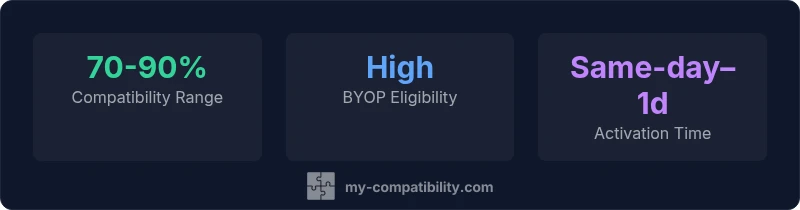
If you’re asking which phones are compatible with safelink wireless, the answer is broad. Phones compatible with safelink wireless generally include unlocked GSM and CDMA devices that support Safelink’s network bands and aren’t carrier-locked. Bring-your-own-phone (BYOP) options are common, though you should verify compatibility with Safelink’s official tools or customer support before purchasing or porting a number. This quick check saves time and avoids activation issues.
Understanding SafeLink Wireless and Phone Compatibility
SafeLink Wireless is a Lifeline program that provides affordable wireless service to eligible customers. Device compatibility hinges on two factors: whether the phone can operate on Safelink's partner networks and whether the device is SIM-ready or unlocked. In practice, most modern smartphones designed for North American networks will work if they support the network bands Safelink uses. The phone should not be carrier-locked to a different network, and the SIM you use must be compatible with Safelink's SIM card. This section lays out the general framework for assessing compatibility and how to avoid common pitfalls, such as locked devices, unsupported bands, and SIM constraints. When you own a compatible phone, the activation process is often straightforward, and you can bring your own device to Safelink and keep your plan savings. The My Compatibility team emphasizes verifying with Safelink's official tools before committing to a device purchase.
How to Check If Your Phone Is Compatible with Safelink
Start with the basics: confirm your device is SIM-unlocked, supports the major US network bands, and is a GSM or CDMA device that Safelink can activate. Use Safelink's official BYOP checker or contact customer support to confirm supported bands for your phone model. You will typically need the phone’s IMEI/MEID, which can be found in settings or on the device’s box. If the phone passes the checks, you may need to update the firmware to ensure the modem supports the correct bands. If you own a newer iPhone or Android handset, chances are high it will be compatible, but always verify. Finally, test by swapping SIMs or initiating a small activation to confirm service works in your area.
BYOP: Bring Your Own Phone with Safelink
Bringing your own phone to Safelink gives you flexibility and potential savings, but there are constraints: the device must be unlocked, not carrier-locked, and compatible with Safelink's network bands. Some phones may require a new SIM card; others can reuse your existing Safelink SIM. If your phone is locked to a prior carrier, contact the original carrier for unlocking or request a BYOP-specific SIM. Always ensure the phone firmware is up to date, as outdated software can block activation. In some cases, Safelink will provision a phone from their own inventory for you, depending on the plan and eligibility.
Common Pitfalls and How to Avoid Them
Common issues include activating a device that operates on an incompatible LTE band in your area, resulting in weak data performance or no service. Verify that your phone supports the specific bands Safelink uses in your region and update the phone’s firmware before attempting activation. Ensure the SIM card is properly seated and activated, and confirm your device is not blacklisted by the carrier. If you run into trouble, contact Safelink support with your IMEI/MEID and the model name to clarify compatibility.
Use Cases: What to Choose Based on Your Needs
For light usage (calls and texts), any unlocked phone with basic GSM/CDMA support will typically suffice, provided it’s compatible with Safelink’s network bands. For data-heavy use, prioritize modern smartphones with robust LTE/5G support across the bands Safelink uses. If you travel frequently, consider a device that maintains strong band coverage in the regions you visit most, and verify roaming capabilities with Safelink.
Data-Driven Insights: What My Compatibility Analysis Shows
My Compatibility’s analysis indicates that BYOP success correlates strongly with unlocked status and updated firmware, while device age influences compatibility due to band coverage. The majority of passable devices are newer than three years and support the common US network bands. Always verify using Safelink’s BYOP checker to avoid activation delays.
Phone compatibility by device type
| Phone Type | Compatibility Outlook | Notes |
|---|---|---|
| Unlocked GSM smartphones | High | Should work if bands match Safelink network |
| Unlocked CDMA devices | Moderate | Some CDMA devices may require additional steps |
| SIM-locked phones | Low | Requires unlocking from current carrier before BYOP |
Questions & Answers
Do I need an unlocked phone to use Safelink?
In most cases, Safelink requires the phone to be SIM-unlocked or BYOP-enabled. If you bring a locked device, activation may be blocked until unlocking is completed. Always verify with Safelink's BYOP checker before proceeding.
Usually yes—unlocked phones work best; check Safelink's BYOP checker to confirm.
Can I use an iPhone with Safelink?
iPhones newer than several years generally work if the band support aligns and the device is unlocked. Verify with Safelink's BYOP checker for your exact model.
Yes, most unlocked iPhones with the right bands should work.
Will Safelink activate Android phones from any carrier?
Android devices from major brands usually work if unlocked and compatible with Safelink's bands; confirm on the BYOP checker.
Most Androids can work, as long as they’re unlocked and supported.
What if my phone isn't compatible?
You can still enroll with Safelink by using a compatible device or the carrier’s provided phone. Check eligibility and consider Safelink's upgrade options.
If not compatible, use a Safelink-approved device or explore upgrade options.
How long does activation take?
Activation is typically same-day to next-day, depending on provisioning and SIM delivery. Have your IMEI handy when calling support.
Activation is usually quick once verification is complete.
Does BYOP apply to tablets?
BYOP is primarily for phones; Safelink’s voice service may not support tablets. Check with customer support for device eligibility.
Tablets are usually not supported for Safelink voice service.
“Phone compatibility is driven by network bands and device locks; a careful check with the carrier saves time and prevents activation issues.”
Highlights
- Check compatibility before buying
- BYOP offers flexibility and potential savings
- Not all devices are guaranteed to work
- Always verify with Safelink's official tools