Nest Thermostat Compatibility Checker: A Practical How-To Guide
Learn how to use a Nest thermostat compatibility checker to verify HVAC compatibility, wiring needs, and installation steps. This practical guide covers common scenarios, safety tips, and authoritative sources to help you plan a successful Nest installation in 2026.


What the Nest Thermostat Compatibility Checker Does
A Nest thermostat compatibility checker is a guided tool that helps you determine whether your heating, ventilation, and air conditioning (HVAC) system can support a Nest thermostat. The goal is to avoid wasted time and costly surprises during installation. According to My Compatibility, a thorough check saves time, reduces the risk of wiring errors, and clarifies power needs before you buy hardware. The checker compiles essential system details—such as HVAC type (gas, electric, or dual-fuel), the presence of a heat pump, the number of heating/cooling stages, 24V control circuit status, and the existence of a C-wire—and compares them against Nest’s documented requirements. You’ll typically see one of three outcomes: compatible with no changes, compatible with recommended wiring changes, or not compatible with Nest in its current configuration. The results also note potential model limitations and advise whether an alternative thermostat might be a better fit. This clarity helps homeowners plan a safe installation window, budget for any needed upgrades, and avoid mid-project interruptions. In addition to the practical result, the checker often provides wiring diagrams and model-specific notes to aid a future technician. If you want to convert a non-standard system, the tool may suggest a compatible Nest model variant or a compatible add-on that makes power delivery stable. By following these steps, you can move from uncertainty to a concrete installation plan, aligned with your home’s energy profile and comfort goals.
Important: Always cross-check the results with your HVAC technician if you’re unsure about a detail or if your equipment is unusually configured.
How Compatibility is Determined
Compatibility hinges on several core factors that ensure the thermostat can safely control the HVAC system. The checker starts by identifying your HVAC type (gas furnace, electric furnace, heat pump, or dual-fuel) and whether your setup is single-stage or multi-stage. It then verifies whether the system uses a traditional 24V AC control circuit, which is the standard for most smart thermostats including Nest. Wiring presence and configuration matter: you need at least R and C wires (or an acceptable power-sharing arrangement) for stable Nest power. The tool also checks for common Nest-specific signals such as W (heat), Y (cool), G (fan), and O/B (heat pump reversing valve) wiring compatibility, and whether the C-wire is required for models that demand continuous power. For heat pump configurations, the checker examines auxiliary heat (Aux/E) and reversing valve control (O/B) compatibility, since incorrect mapping can cause inefficient operation or failed cooling. Additionally, Nest models may differ in their requirements for software update paths, supported accessory wiring, and compatibility with humidifiers or dehumidifiers that rely on the same control circuit. Important caveats include older HVAC equipment with non-standard control voltages or proprietary communication protocols, which can limit Nest functionality. In practice, the checker translates technical specs into a simple verdict, often accompanied by recommended wiring diagrams and a list of any needed hardware upgrades. This comprehensive approach minimizes post-install surprises and supports energy-efficient operation aligned with your home’s specific needs. My Compatibility emphasizes validating critical items before purchasing hardware to prevent incompatible purchases.
Ready Your Home for a Checkup
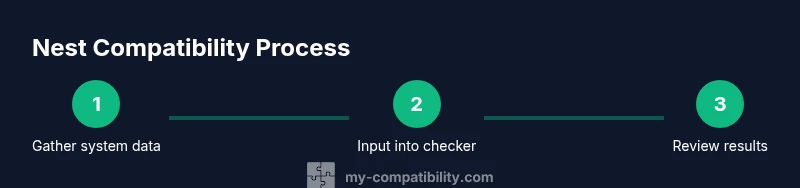
Before you run the checker, assemble a small set of information to ensure fast, accurate results. Gather the make and model of your furnace or air handler, your outdoor condenser unit if you have central AC, and any existing thermostat base labeling. Locate the current thermostat’s wiring terminals and take a picture or sketch of the base plate, noting wire colors and where each wire is connected (R, C, W, Y, G, O/B, AUX, etc.). If your system includes a heat pump or dual-fuel configuration, collect documentation related to the reversing valve and auxiliary heat control. Having the HVAC manual or installation sheet on hand helps you interpret electrical specs correctly. The power source and voltage are also important: most Nest-compatible systems run on 24V AC; some legacy equipment may require different approaches that the checker will flag. If you’re unsure about a wire’s function, it’s wise to label or photograph it before disconnecting anything. A safe environment is crucial for any wiring work—disconnect power at the breaker panel before examining wires. Finally, ensure you have reliable internet access and a device (phone, tablet, or computer) to run the checker. With these preparations, you can proceed to input accurate data and receive a trustworthy recommendation.
Using the Checker: A Step-by-Step Scenario
Scenario: You have a gas furnace, a central AC compressor, and a conventional single-stage system with a 24V thermostat circuit. You locate the R and C wires and confirm the presence of G, Y, and W terminals. You access the Nest compatibility checker and input system type, number of stages, and wiring details as prompted. The checker confirms compatibility but notes that a C-wire is strongly recommended for stable power on certain Nest models. It then suggests verifying the C-wire at the air handler and, if not present, using a common wire adapter or a compatible Nest model variant. In another scenario, if you had a heat pump with auxiliary heat and no C-wire, the checker would likely recommend a different Nest model or a professional wiring upgrade. The key is to follow the exact prompts, review the advised wiring changes, and document any parts you’ll need to purchase. After running the check, you’ll have a clear plan: assume you’ll install a Nest, identify wiring changes, and schedule a technician if needed. This approach minimizes guesswork and aligns with best-practice home automation planning for 2026.
Common Pitfalls and How to Avoid Them
- Incomplete data entry: Tiny mistakes in wire color or terminal labels lead to incorrect results. Double-check each input against the base plate photo and the furnace diagram.
- Ignoring the C-wire requirement: Some Nest models will run on power stealing, but continuous 24V power reduces the risk of thermostat browning or reset issues.
- Overlooking heat pump specifics: O/B valve operation and Aux/E heat can affect Nest performance; ensure the map aligns with your equipment.
- Assuming compatibility means immediate installation: Compatibility is a pre-install check, not a guarantee; some installations require a professional adjust or add-on hardware.
- Skipping safety steps: Always disconnect power before touching thermostat wiring and confirm there’s no live current on any conductor. When in doubt, pause and consult a licensed HVAC tech.
- Relying on a single source: Use official manuals, the correctness of the model variant, and multiple sources to confirm compatibility. Cross-check results with the installer’s guidance to avoid costly errors.
By being mindful of these pitfalls, you’ll avoid common missteps and increase the likelihood of a smooth Nest installation.
Post-Check Actions: If Compatible or Not
If the checker returns compatible with minor caveats, your next steps typically include gathering any recommended accessories (like a C-wire adapter or a professional wiring upgrade), ensuring your power supply is adequate, and preparing a safe installation plan. Schedule a quick service if your HVAC equipment is older or uses unconventional signaling. If the result is not compatible, you have several options: explore Nest models with lower power requirements, consider a third-party power extender kit if compatible with your system, or consult a licensed HVAC technician to assess potential rewiring or system upgrades. In some cases, you may replace the thermostat with a non-Nest smart thermostat that better matches your control wiring. The core idea is to translate the checker’s report into a concrete plan—what hardware is needed, what changes to wiring or power are required, and how to minimize heat loss or energy waste after installation. Keeping records of input data and the recommended steps helps you track progress and ensures you follow a safe, efficient path to a comfortable home environment. My Compatibility’s guidance emphasizes practical, data-driven decisions for 2026 home upgrades.
Authoritative sources and updates
To deepen your understanding of thermostat compatibility principles and energy-saving guidance, review these credible sources:
- https://www.energy.gov
- https://www.nist.gov
- https://www.consumerreports.org
These sources provide high-level guidance on smart thermostats, electrical safety, and energy efficiency that complements the Nest compatibility checker. Remember that check results can change with firmware updates or new Nest model variants, so revisit your results periodically and after any major HVAC maintenance or electrical work.
Next Steps and Maintenance
- Review the checker’s results, document any required wiring changes, and prepare a shopping list for adapters or new wires.
- Schedule installation with clear safety guidelines and, if needed, a licensed HVAC technician for complex configurations.
- After installation, run a few test cycles to verify heating and cooling control, fan operation, and reliable power to the Nest. If any issue arises, consult the professional resources you’ve collected and re-run the checker to confirm no new conflicts exist.