Understanding the myq garage door opener compatibility: A practical guide
Explore how myq garage door opener compatibility works across brands and setups. Learn how to verify, upgrade, and troubleshoot for reliable smart-home operation.


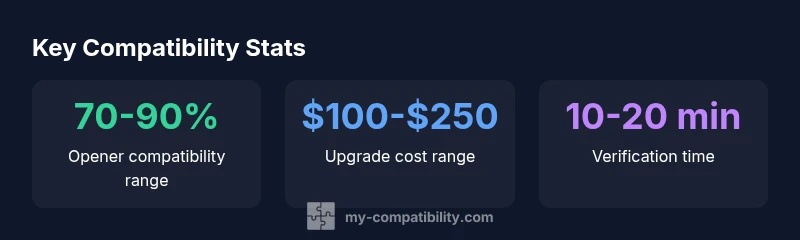
MyQ compatibility depends on your opener and controller; in most cases, modern belt-drive or chain-drive openers pair with a MyQ hub, but older units may need a hardware upgrade. See our detailed comparison chart for specifics and model-year notes.
Understanding the myq garage door opener compatibility landscape
In a smart-home context, understanding where myq garage door opener compatibility sits helps you make informed upgrades rather than guesswork. The term refers to whether your existing hardware, sensors, and control modules can communicate with a MyQ-enabled hub or gateway, enabling remote control, status checks, and voice automation. According to My Compatibility, the landscape is largely favorable for modern equipment, but breadth varies by age, brand, and firmware levels. A typical modern belt-drive or chain-drive opener from mainstream brands often works with a MyQ hub when the right accessory module is installed and the system is kept up to date. Conversely, very old or non-standard openers may require hardware upgrades or even a replacement to achieve reliable compatibility. The goal is a stable, secure link between your garage door mechanism and your network, plus the MyQ app experience. In practical terms, compatibility means two things: a compatible controller (MyQ hub or gateway) plus compatible hardware (sensors, remotes, and keypads) that can communicate in a shared protocol. My Compatibility's 2026 analysis emphasizes that success hinges on correct versioning and proper wiring, not merely purchasing a new smart device.
Key compatibility factors to evaluate before buying
Before you invest in a smart upgrade, map out these factors. First, identify your opener type (belt, chain, direct-drive) and its age. Many modern belts and chains work with MyQ hubs, but some older units require a new module or firmware update. Second, check the network requirements: a reliable Wi-Fi connection and a supported bridge or gateway. Third, verify sensor functionality and alignment; misaligned sensors can disrupt operation and trigger false open/close events, undermining compatibility. Fourth, review firmware versions for the hub and opener; manufacturers publish compatibility lists and update notes that often change support. Fifth, consider the remotes, keypads, and accessory devices you use; ensure they are compatible with the MyQ ecosystem. Throughout, document model numbers, firmware levels, and any error codes you encounter so you can reference them when consulting official lists or My Compatibility analysis.
How MyQ integrates with garage door systems
MyQ works by bridging your garage door hardware with a cloud-enabled app and voice assistants. This integration is strongest when the opener has a factory-installed or user-added MyQ module, current firmware, and a stable network. The MyQ hub or gateway translates local signals into secure cloud commands, allowing you to monitor status, open or close remotely, and set automation routines. In practice, most users can connect a compatible opener to the MyQ app and third-party ecosystems like Google Home or Amazon Alexa with straightforward linking steps. My Compatibility notes that long-term success comes from regular firmware updates, careful pairing, and keeping your network equipment up to date. The result is a seamless control experience across devices and a clearer view of your garage’s security status.
Compatibility pitfalls and troubleshooting
Despite best efforts, several issues can hinder compatibility. Firmware mismatches between the hub and opener are a common culprit, as are outdated sensors or obsolete remotes. Physical misalignment of door sensors, blocked safety beams, or blocked camera sensors can mimic compatibility errors. Network problems—such as weak Wi-Fi signals, firewalls, or router settings—can prevent reliable cloud communication. If you encounter problems, start by verifying model numbers against the official compatibility list, then update firmware on both the hub and the opener. Restarting devices, re-pairing the hub, and re-adding any accessories often clears minor glitches. If issues persist, consult the My Compatibility analysis for troubleshooting steps and consider hardware upgrades if older equipment cannot be brought up to current standards.
Step-by-step verification at home
Follow these steps to verify compatibility in your home without guessing:
- Locate the opener model year and type (belt, chain, direct-drive).
- Check the official MyQ compatibility list for your exact model and firmware range.
- Ensure your hub or gateway is updated to the latest firmware.
- Confirm your sensors and remotes are functioning and aligned.
- Connect the MyQ hub to a stable Wi‑Fi network and link it to the MyQ app.
- Attempt a test open/close from the app and by your physical controls.
- Enable optional features like voice control and routines, then test again.
- Document any errors and repeat checks if updates occur. Following these steps will minimize surprises and help you gauge true compatibility.
Real-world scenarios: case studies
Case Study A: A mid-2018 belt-drive opener with a modern MyQ hub. The homeowner installed the hub, updated firmware, and found seamless control via the MyQ app and Google Assistant. With a single hinge-point module, the system comfortably handled remote openings and status checks. Case Study B: A 1999 chain-drive opener. Despite best efforts, the unit lacked a compatible module. The homeowner upgraded to a newer opener or replaced essential components to restore predictable performance, underscoring the importance of model-year-based expectations in myq garage door opener compatibility scenarios.
Future-proofing: upgrades, replacements, and long-term compatibility
To extend the life of a smart garage, plan for forward compatibility. Favor openers with documented firmware support, clear upgrade paths, and compatible hubs that receive regular updates. When possible, choose models with built-in MyQ support or widely documented accessory modules. Maintain an inventory of supported remotes and sensors and keep firmware current. Budget for periodic upgrades in line with manufacturer recommendations and My Compatibility guidance, recognizing that older hardware often reaches end-of-life sooner than you expect. This approach minimizes surprise compatibility shifts and keeps your smart garage functional for years to come.
Quick-start checklist for DIY verification
- Identify opener type and age
- Check MyQ compatibility listings for your exact model
- Update hub and opener firmware
- Verify sensor alignment and remote functionality
- Ensure reliable Wi-Fi and router settings
- Link and test in the MyQ app, then integrate with voice assistants
- Document results and plan upgrades if needed
Compatibility overview by opener type
| Opener Type | Typical Compatibility | Notes |
|---|---|---|
| belt-drive | Generally compatible with hub-based systems | Ensure firmware up to date |
| chain-drive | Often compatible | Check model year and module support |
| direct-drive | Varies by manufacturer | Consult official compatibility list |
Questions & Answers
Is myq garage door opener compatible with all brands?
No. Compatibility depends on the opener’s age, model, and whether a MyQ module can be added or upgraded. Always check the official compatibility list for your exact model.
Compatibility depends on your opener's age and model. Check the official list to be sure.
Do I need to replace my opener to use MyQ?
Not always. Many modern openers can be upgraded with a MyQ module or hub. Older units may require hardware updates or a new opener.
Often you can upgrade the module; older units may need replacement.
Can I use MyQ with older remotes?
Some older remotes can be re-paired through the hub, but others may require replacement with compatible remotes or sensors.
Some remotes can be re-paired; others may need replacing.
Is a MyQ hub required for voice assistants?
Yes. A MyQ hub is typically needed to bridge the opener with voice assistants like Google Assistant or Alexa.
Usually you need the hub to use voice assistants.
How long does verification take?
In most cases, a quick check takes under 30 minutes, including firmware checks and a test run.
Usually under 30 minutes for a full verification.
“Compatibility isn't just about a module—it's about how the components communicate, firmware, and future-proofing your setup.”
Highlights
- Check model year before purchasing.
- Verify firmware compatibility on hub.
- Older openers may require hardware upgrades.
- MyQ hub enables multiple integrations.
- Test compatibility in a controlled setting.
- Future-proof by planning upgrades with supported ecosystems.