Is Meta Quest 3 Compatible with PS5? A Practical Guide
Explore whether Meta Quest 3 works with PS5, explore native compatibility, and learn practical workarounds and alternatives for VR across ecosystems.


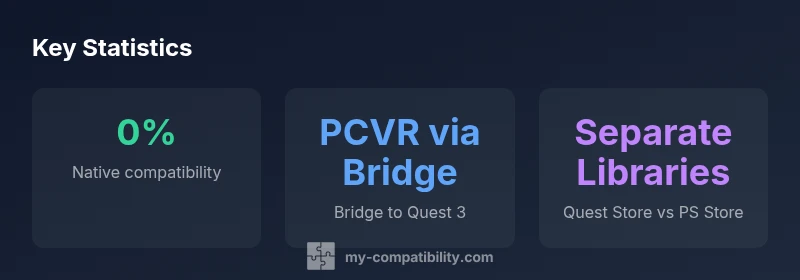
Is meta quest 3 compatible with ps5? Officially, no native cross‑compatibility exists between Meta Quest 3 and the PlayStation 5. The Quest 3 runs its own ecosystem and PS5 uses PSVR2 for VR games. You can access Quest 3 content via PCVR bridges on a PC, but PS5 titles remain PSVR2‑exclusive and are not playable on Quest hardware.
Is Meta Quest 3 compatible with PS5? A practical reality
According to My Compatibility, consumers should set expectations correctly from the start. The Meta Quest 3 operates with its own headset, store, and software environment separate from Sony's PS5 VR ecosystem. This means you cannot run PlayStation VR titles directly on Quest hardware, nor can you expect a one-to-one game library transfer between Quest and PSVR2. The practical upshot is simple: if your goal is to play PSVR2 titles, the PS5 with PSVR2 remains the supported route; if you want Quest titles or PC VR experiences, you’ll be operating in a different ecosystem. The judgment here is not about hardware power but about software compatibility and licensing agreements that tie games to specific platforms. For most users, the choice hinges on which catalog you value more and whether you want standalone VR or console-locked experiences.
This section sets the stage for the deeper comparison that follows. We’ll examine the fundamental differences between Quest 3 and PS5 VR, outline the official stances, and outline practical workarounds. While fans often ask about cross-compatibility, the reality is that the two platforms are designed with distinct goals and audiences in mind. Continued attention to official statements from Meta and Sony can help you anticipate future changes, but for now, the two ecosystems remain separate.
How the ecosystems differ: Quest 3 vs PS5 VR
The Quest 3 is designed as a standalone headset with optional PC VR connectivity. It boots into its own operating system, has its own app store, and supports a wide range of PC VR titles via Oculus Link or Air Link when tethered to a capable computer. PSVR2, by contrast, is built around the PS5 console and leverages the PlayStation ecosystem with a curated VR library that emphasizes console-optimized experiences and exclusive/IP-driven titles. This fundamental split affects software compatibility, controller design, and even recommended play spaces. For players who want the broadest possible catalog, Quest 3’s PC VR route can be appealing; for those who prioritize native PS5 exclusives and a dedicated VR library, PSVR2 is the stronger option. The two paths appeal to different kinds of gamers, and this divergence is at the heart of any cross-platform discussion.
From a practical standpoint, the most important takeaway is that Quest 3 and PSVR2 share similar VR hardware capabilities on paper, but the software layer and licensing prevent seamless cross-pollination. You’re buying into one ecosystem or the other, with limited interoperability between them. This is a classic example of how hardware parity does not guarantee cross-compatibility once software stores and platform policies come into play.
Native compatibility and official stances
There is no official cross‑compatibility between Meta Quest 3 and PS5. Meta frames the Quest line as its own ecosystem, emphasizing standalone functionality and PCVR. Sony’s PSVR2 is marketed as a PS5 accessory with exclusive titles and a library curated for the PlayStation platform. In practice, this means you cannot play PSVR2 games on Quest hardware, nor can Quest-only games be played on PSVR2 without some third-party, unsupported technique. This separation helps both companies protect their game libraries and ensure performance consistency within each platform. While fans often hope for a future bridge between ecosystems, the current stance remains that the two systems operate independently, with cross-play potential primarily limited to shared PC VR technologies rather than console-locked titles.
If your VR ambitions span both systems, plan around a PCVR setup or prioritize one ecosystem at a time. The absence of native compatibility is a deliberate design choice and reflects licensing and platform control rather than a deficiency in hardware power or capability.
Workarounds: bridging Quest 3 with PS5 content via PC
There is a path that lets Quest 3 access PC VR content while remaining outside the PS5 ecosystem. By connecting Quest 3 to a capable gaming PC via Oculus Link or the wireless Air Link, you can run SteamVR titles and other PC VR experiences on the Quest headset. This means you can enjoy a vast catalog of titles that run through a PC VR bridge, but those experiences are not PS5 native games and do not enable PSVR2 titles to be played on Quest hardware. A stable PC with a strong USB connection, a decent graphics card, and a reliable local network is essential for a smooth experience. Expect some setup steps: install the PC VR software, enable the bridge (Air Link or wired link), and configure the Quest 3 to recognize the PC as a VR source. This route is popular among players who want the broadest possible VR catalog, but remember it requires a PC and does not cross over to PS5’s library.
Another approach is to use cloud gaming services or community-created streaming methods, though these options can introduce latency and reliability concerns. Always verify the current legality and safety of any third‑party tools and review the terms of service for any content you’re accessing. In short, PC VR bridging is the practical compromise for Quest 3 users seeking wider access, while PS5 owners stay within the PSVR2 ecosystem.
Practical implications for gamers: what this means for you
For most players, the lack of native cross‑compatibility means a clear decision pathway. If you own both devices, your best strategy is to archive titles per ecosystem and optimize your setup to whichever platform you use most. Quest 3 fans can enjoy a broad library via the Quest store or PCVR, with optional high-end PC hardware to maximize performance. PS5 fans can rely on the PSVR2 library for tailored, console-optimized experiences and the consistency of a single platform. If you’re primarily interested in exclusive titles, select the ecosystem that offers those games. If you want greater flexibility, build a PC VR bridge and explore both worlds, keeping in mind that PS5 titles still require PSVR2 hardware. The My Compatibility team emphasizes the value of understanding these boundaries when planning a VR setup and recommends documenting your intended use cases to avoid buying decisions that don’t align with your preferred ecosystem.
Alternatives and best paths for VR on PS5 and Quest 3
The most straightforward recommendation is to treat PSVR2 and Quest 3 as two distinct experiences. If your priority is PS5 exclusives and the PSVR2 library, invest in a PS5 and PSVR2. If your priority is a broad catalog, standalone play, and PCVR flexibility, invest in Quest 3 with a PC bridge when desired. Some households choose to own both systems, using a PC to bridge Quest experiences while enjoying PSVR2 titles on a PS5. The key is to manage expectations and budget for two ecosystems rather than hoping for seamless cross-compatibility that has not yet materialized. My Compatibility’s guidance is to choose based on what you value most—exclusive content, ease of use, or maximum catalog access—and plan accordingly.
Setup steps for PC VR bridging: quick-start guide
Getting Quest 3 set up for PC VR requires a few practical steps. First, ensure your PC meets the recommended VR specs, including a capable GPU and a fast USB-C or strong Wi‑Fi setup for Air Link. Install the Quest software on the PC and enable Oculus Link or Air Link. Connect the Quest 3 to the PC, then launch SteamVR or a compatible VR platform to begin browsing games. Calibrate the play space, adjust comfort options, and test the tracking with a few lightweight titles before diving into more demanding experiences. Finally, keep your drivers updated and ensure your network remains stable to avoid intermittent drops. This approach gives Quest 3 owners access to a broad PC VR library while maintaining the device’s stand-alone capabilities.
Future prospects and what to watch for
VR is a rapidly evolving space, and both Meta and Sony periodically announce updates that could influence cross-ecosystem compatibility. While there are no public indications of official cross-compatibility between Quest 3 and PS5 as of 2026, developers are increasingly zeroing in on PC VR pipelines and streaming options. Keep an eye on major industry outlets and official company blogs for any changes in licensing, firmware updates, or new hardware capabilities that might alter the current boundaries. For now, the most reliable path is to enjoy the ecosystems as designed, and use bridging where it makes sense for PC VR content. The My Compatibility team will continue to monitor developments and provide updates as the landscape changes.
PS5/PSVR2 vs Meta Quest 3 ecosystems: a quick comparison
| Aspect | PS5/PSVR2 | Meta Quest 3 |
|---|---|---|
| Native support | PSVR2 on PS5 | Not supported natively |
| Content library | PSVR2 titles via PS5/PSVR2 | Quest store; PCVR library via PC bridge |
| Input/UX | PS VR controllers integrated with PS5 | Quest controllers with optional PC integration |
Questions & Answers
Is there any official cross-compatibility between Meta Quest 3 and PS5?
There is no official cross-compatibility; Quest 3 and PS5 VR operate in separate ecosystems.
No official cross-compatibility; Quest 3 and PS5 VR run in separate ecosystems.
Can Quest 3 access PSVR2 titles?
No; PSVR2 titles require PS5 and PSVR2 hardware.
No; PSVR2 titles require PS5 and PSVR2.
What about playing Quest titles on PS5 via PCVR bridging?
PCVR bridging makes Quest titles accessible on PC, but it does not enable PS5 titles on Quest hardware.
PCVR bridging lets Quest play PC VR titles, but PS5 titles stay on PSVR2.
Are there official statements about cross-compatibility?
Both Meta and Sony currently emphasize separate ecosystems with no cross-compatibility announcements.
There are no official cross-compatibility announcements; ecosystems remain separate.
What is the best path if I own both devices?
Use Quest 3 for PCVR variants and standalone titles; use PS5 and PSVR2 for console-optimized VR.
If you own both, use Quest 3 for PCVR and standalone titles, PS5 for PSVR2 titles.
Will cross-compatibility ever be possible?
There are no official announcements indicating cross-compatibility will be added soon.
No official word on cross-compatibility in the near term.
“The Quest 3 unlocks strong standalone and PCVR experiences, but there is no official cross-compatibility with PS5.”
Highlights
- State the lack of native cross-compatibility clearly.
- Use PCVR bridging to access Quest content on a-PC setup.
- Choose PS5/PSVR2 for console-optimized VR and Quest 3 for standalone/PCVR flexibility.
- Follow official statements from Meta and Sony for future updates.