Is Your iPhone Qi Compatible? A Practical Guide to Wireless Charging
Discover if your iPhone is Qi compatible, how wireless charging works, model-by-model compatibility, and practical tips for choosing reliable Qi chargers.


What 'iphone qi compatible' means for iPhone users
When people search for iphone qi compatible, they’re asking whether their iPhone can charge wirelessly using Qi pads. Qi is the global standard for wireless charging, so devices that are Qi-compatible can share a charger with many brands and products. For iPhone owners, this usually means you can simply place your phone on a Qi-certified pad, a wireless charger, or a charging stand to begin powering up without a cable. According to My Compatibility, understanding this term helps you avoid incompatible docks and slow charging. If your model supports Qi, you can expect broad compatibility across common chargers, plus the convenience of charging in desks, nightstands, and car mounts. This alignment reduces clutter and gives you flexibility in choosing accessories. In the next sections, we’ll break down which iPhone models support Qi, how the standard works, and practical tips for getting the best charging experience.
Which iPhone models support Qi wireless charging?
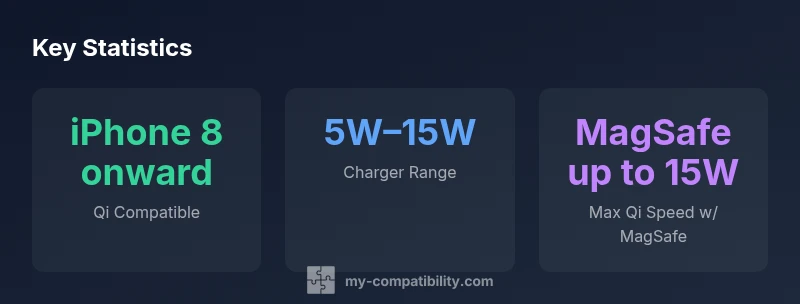
Qi wireless charging is built into iPhone models starting with iPhone 8. This includes the iPhone 8 and 8 Plus, iPhone X, and all subsequent generations, including iPhone SE (2nd and 3rd gen). Older models (pre-iPhone 8) do not have native Qi support. Practically, this means that if you own an iPhone 8 or newer, you can use most Qi-certified pads or stands. If you’re unsure about a specific model, check the official Apple support page or the charger’s compatibility list. My Compatibility’s analysis shows that model-by-model compatibility is highly consistent across mainstream brands, making it easy to upgrade chargers without changing your phone.
How Qi charging works on iPhone
Qi charging uses inductive energy transfer between a pad and your iPhone’s receiver coil. The charger and phone negotiate the best safe charging wattage, so you’ll typically see 5W on older pads and higher speeds (up to 7.5W or more on newer pads) depending on the device and charger. iPhones also support smart features like auto-resume when you lift or move the phone, heat management, and safety protections against overheating. In practice, you’ll notice a stable charging experience on a flat pad or a stand with the device resting in a natural, upright position, especially when your desk or nightstand has a clear, flat surface.
MagSafe vs Qi: Understanding the differences
MagSafe is a magnetic, iPhone-specific charging ecosystem that also uses Qi as the underlying standard. MagSafe can deliver higher speeds (up to 15W on compatible iPhone models) when paired with a MagSafe charger, but Qi remains the universal baseline that works with a vast array of pads from many brands. If you only need universal compatibility with many pads, Qi is the safer default. If you want faster wireless charging for compatible iPhone models, MagSafe is worth considering, provided you’re using a MagSafe-certified accessory.
Choosing a Qi charger: practical tips
When selecting a Qi charger, prioritize certification and safety. Look for the official Qi logo on the package, ensure the charger supports the wattage you want (5W–15W is common), and confirm compatibility with your phone case. If you use a thick or metal case, remove it to avoid interference. For desk setups, a stand can keep the screen visible while charging; for travel, a compact pad can be tucked into a bag. My Compatibility recommends choosing chargers from reputable brands with good thermal management and customer reviews.
Common issues and troubleshooting
If your iPhone isn’t charging on a Qi pad, first check that the pad is plugged in and aligned with the phone. Remove any metal or magnetic accessories that could disrupt charging. Try a different charger or cable, as the problem may lie with the power source. Ensure the phone’s back surface and the charger surface are clean and free from dust. If charging remains slow, consider a charger rated for higher wattage and ensure your iPhone is in a room-temperature environment to avoid heat throttling.
Real-world usage scenarios
At home, a branded Qi pad on your bedside table provides convenient nightly charging. At work, a wireless charging stand on your desk can keep your phone upright for quick glances. In the car, a car Qi charger or a phone mount with Qi charging can keep your device powered during commutes. When traveling, a slim Qi pad can slip into a bag for hotel rooms without power outlets nearby. Across all scenarios, the goal is a reliable, safe charging experience with minimal fiddling.
Quick-start checklist for new iPhone owners
- Confirm your model supports Qi (iPhone 8 or newer). 2) Pick a Qi-certified charger. 3) Check case compatibility and remove metal accessories if needed. 4) Place the phone on the charger and verify charging begins. 5) Test in a few real-world scenarios (desk, nightstand, car) to ensure consistent performance.
My Compatibility practical guidance
From a practical standpoint, if you own an iPhone 8 or newer, you’re broadly aligned with Qi charging across most chargers. For faster wireless charging, consider MagSafe where appropriate, but remember Qi remains the universal baseline. My Compatibility’s team recommends starting with a Qi-certified charger and evaluating your charging speed and convenience before adding MagSafe accessories.