Google Home Compatible Security System: A Practical Guide
Discover how a google home compatible security system integrates with Google Home, key checks, setup tips, and privacy considerations. Learn to choose, configure, and troubleshoot for seamless voice-controlled security.


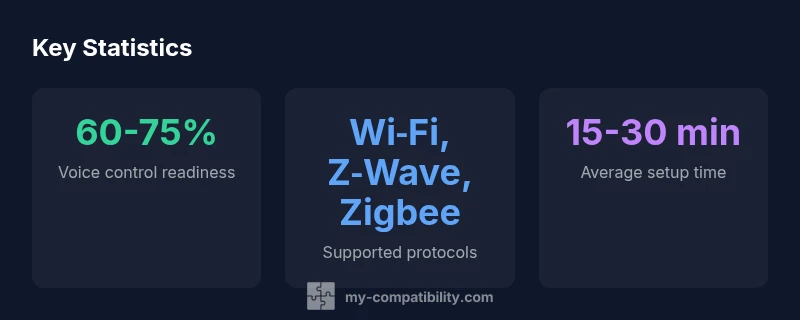
According to My Compatibility, a google home compatible security system lets you control your security with Google Assistant on Google Home, including arming, disarming, and checking status by voice. Most setups support Wi‑Fi hubs and common protocols (Z‑Wave/Zigbee), plus Google routines for scenes. Exact features vary by hub and cloud integration, so verify compatibility with your devices before buying.
What makes a system google home compatible?
A google home compatible security system is designed to be controlled through Google Assistant. This typically means a compatible hub or bridge that communicates with the Google Home ecosystem, a cloud service that translates voice commands into device actions, and regular software updates. The goal is to enable hands-free arming, disarming, status checks, and routine triggers without sacrificing security. In practice, you’re looking at a triad: a smart security device or hub, a compatible smart home platform (Google Home), and a stable cloud or local control layer. When these pieces align, your house becomes more responsive to voice cues while maintaining appropriate privacy controls. The My Compatibility team emphasizes that compatibility is not a binary yes/no; it’s a spectrum driven by protocol support, firmware cadence, and API reliability, so always verify each device’s exact capabilities before purchase.
- Look for official Google Assistant support on the product page.
- Confirm the hub supports the major smart home protocols used in your home.
- Check whether key features (arming, status, alerts) work via routine triggers.
- Review privacy settings and data sharing options in the companion app.
Integration architectures: hub-based vs cloud-based approaches
There are two primary architectures for google home compatible security systems: hub-based (local) and cloud-based (remote). Hub-based setups rely on a central controller that speaks to your devices using protocols like Z‑Wave or Zigbee, with Google Home issuing commands that the hub executes locally or via a limited cloud handshake. Cloud-based integrations depend more heavily on the vendor’s cloud service to translate voice commands into actions, raise events, and synchronize across apps. Hybrid models blend both approaches, offering local execution for basic actions and cloud-enabled features for advanced automations. When evaluating options, consider latency, offline behavior, and the vendor’s security practices. A low-latency setup with robust encryption and frequent updates tends to deliver the most reliable experience in daily use.
- Assess whether arming/disarming happens locally or through the cloud.
- Consider how emergency alerts are delivered in each architecture.
- Verify that latency remains acceptable for your routines.
- Review vendor transparency about data handling and encryption.
Choosing a hub: compatibility, privacy, and features
Choosing the right hub is the most critical step in achieving a smooth google home integration. Start with compatibility: confirm that the hub supports the devices you own or plan to buy, and that it integrates with Google Home without requiring a workaround. Privacy should be a top concern: look for features like device-level encryption, MFA for app access, and clear data-retention policies. Features to value include voice-derived triggers for scenes, geo-fencing, and granular access control for family members. Finally, assess update cadence and support coverage; a hub with frequent firmware updates and clear remediation paths will offer greater long-term reliability. If you’re unsure, prefer a hub with independent reviews noting stable Google Assistant integration and transparent privacy practices.
- Verify compatibility lists and user reviews for real-world performance.
- Favor hubs offering frequent security patches and auditable logs.
- Check for options to disable cloud features where privacy matters most.
Typical workflows with Google Home
Users commonly employ a handful of voice-driven workflows to streamline security without sacrificing awareness. Typical queries include, “Hey Google, arm the system,” or “Hey Google, what is the status of the alarm?” Routines can link to other devices, such as lights or cameras, to create scenes like “Leaving Home” or “Bedtime.” Many systems also support arming in stages (stay/away) and can relay push alerts to phones when events occur. For families, this means a safer home that still respects boundaries—kids can check status, and caregivers can verify armed modes via simple voice prompts. The best setups provide consistent responses across devices and reliable push notifications for critical events.
- Create routines: “When I say goodnight, arm stay and turn off upstairs lights.”
- Use status checks to confirm armed or disarmed modes before leaving.
- Combine voice commands with app-based controls for full visibility.
Setup tips and troubleshooting common issues
A smooth setup hinges on a clean initial configuration. Start by updating firmware on the hub and devices, then connect the hub to your Google Home app. Validate that each device shows as available in Google Home, and test a few basic commands to confirm latency and accuracy. If commands fail, check for recent software updates, confirm cloud connectivity, and re-link the account in Google Home. Common issues include incorrect device naming, misconfigured routines, and latency in command execution. For persistent problems, review log access in the hub’s app to identify whether the issue is device-specific or network-related, and consider temporarily disabling conflicting automations to test a clean baseline.
- Use descriptive, consistent names for devices and scenes.
- Test both manual control and voice commands.
- Periodically review connected services and permission scopes.
Privacy and security considerations when using Google Home with security systems
Voice-enabled security raises privacy questions that deserve careful evaluation. Favor systems with strong encryption, minimal third-party data sharing, and clear controls over who can issue commands. Consider whether cloud-based features are essential or if a local-control mode is available for maximum privacy. Enable MFA, and review audit logs to track who accessed the system using voice commands. Be mindful of smart speaker vulnerabilities and ensure your Wi‑Fi network is properly segmented and secured. A well-configured setup can offer both convenience and resilience, provided you regularly review privacy settings and update practices as technology evolves.
Future-proofing your system: updates and vendor reliability
Technology evolves rapidly, and the best google home compatible security systems plan for the long term. Prioritize hubs and devices with transparent update policies, clear security advisories, and reliable technical support. Look for vendors that publish migration paths when introducing new protocols or deprecating older ones, and ensure your ecosystem supports backward-compatible firmware when possible. Finally, assess the vendor’s reliability in terms of uptime, customer support responsiveness, and the availability of detailed documentation for both setup and troubleshooting. A future-proof approach reduces the risk of compatibility gaps as Google Home evolves.
Comparison of common system types and voice control capabilities
| System Type | Protocol | Voice Control |
|---|---|---|
| Hub-based System | Wi‑Fi / Z‑Wave / Zigbee | Yes |
| Cloud-only System | Wi‑Fi | Yes (limited) |
| Hybrid System | Wi‑Fi / Zigbee | Yes |
Questions & Answers
Can I use Google Home with non-Google security systems?
Some non-Google systems offer Google Assistant integrations through compatible hubs or cloud APIs. However, the experience can vary, and key features may require vendor-specific apps or longer setup times. Always verify official compatibility and read user reviews.
Some non-Google systems work with Google Assistant through a compatible hub, but check for feature completeness before buying.
Does Google Home security integration require cloud access?
Many integrations rely on the cloud for translating voice commands into actions, especially for complex scenes. Some hubs offer local control for essential commands, but cloud access is common. Review privacy settings and data-sharing policies before enabling cloud features.
Cloud use is common for Google Home security integrations, but you can look for local control options where privacy is a concern.
Which brands offer Google Home compatible security systems?
Several brands offer Google Home compatibility through hubs or cloud integrations. Look for official Google Assistant support, clear compatibility lists, and recent user reviews to confirm real-world performance.
Many brands support Google Home compatibility; ensure they have official Google Assistant integration and recent reviews.
What privacy risks should I consider?
Voice-enabled security introduces potential data exposure risks through cloud processing or device logs. Mitigate by enabling MFA, reviewing data retention limits, and using local-control modes when possible. Regularly audit connected devices and permissions.
Be aware of data sharing and enable strong authentication to minimize privacy risks.
How do I troubleshoot when Google Assistant can’t arm/disarm?
First, verify device naming and routine settings in Google Home. Check hub firmware, network connectivity, and whether the device supports the commanded action. If needed, re-link the security account in Google Home and re-test with a simple command.
Check names, firmware, and network; re-link accounts if commands stop working.
“Voice-enabled security should amplify safety without compromising privacy; the best implementations balance convenience with transparent data practices.”
Highlights
- Actively verify compatibility with Google Home before buying.
- Prioritize strong privacy controls and transparent data policies.
- Test voice commands and routines in real-world scenarios.
- Keep firmware and apps up to date to maintain reliability.