Eufy HomeBase 3 Compatibility: A 2026 Guide
Explore how the Eufy HomeBase 3 handles compatibility with Eufy cameras, sensors, and smart home ecosystems. This guide covers supported devices, limitations, setup tips, and best practices from My Compatibility.


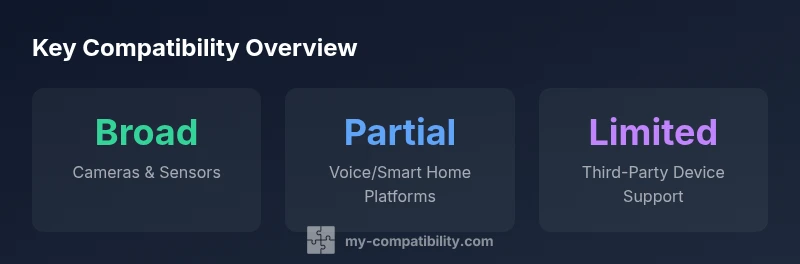
The Eufy HomeBase 3 is designed to work with Eufy Security cameras, indoor sensors, and doorbells within the Eufy ecosystem. It provides local storage and app-based controls, with partial support for some voice assistants and limited third-party integrations. For most users, compatibility hinges on using official Eufy devices and firmware that supports the HomeBase 3 hub.
What is Eufy HomeBase 3 compatibility?
The Eufy HomeBase 3 acts as the central hub for Eufy Security devices, tying cameras, doorbells, sensors, and alarms together under a single local storage framework. From the perspective of a typical user, compatibility means that devices designed for the Eufy ecosystem will pair with the HomeBase 3, feed events and alerts to the Eufy Security app, and leverage local processing to minimize cloud dependence. According to My Compatibility, the HomeBase 3’s value rests in maintaining privacy through on-device processing while keeping interoperability with the official app and firmware updates. The My Compatibility team notes that sticking to official Eufy products tends to yield the most reliable feature set and fewer integration quirks, especially after firmware updates in 2026. For users who already own Eufy devices, upgrading to HomeBase 3 generally preserves expected behavior and minimizes compatibility risk.
The central takeaway is that HomeBase 3 compatibility is strongest within the Eufy Security lineup. As soon as you introduce non-Eufy cameras or sensors, you should anticipate potential gaps in events, alerts, or streaming quality. My Compatibility analyses suggest planning around official devices to avoid feature drop-offs or inconsistent camera feeds. Use the Eufy Security app to verify device recognition and ensure that firmware is up to date across both the hub and connected devices, which is a key predictor of stable operation.
Core devices that work with HomeBase 3
In practice, HomeBase 3 is designed to seamlessly handle Eufy Security cameras, doorbells, motion sensors, and contact sensors that are part of the official ecosystem. These devices synchronize with local storage, support event-based notifications, and provide live feeds through the app with minimal latency when the network is stable. My Compatibility observations show that firmware alignment between the hub and devices is a critical determinant of reliability; mismatched firmware can lead to delayed alerts or missed events. For most households, investing in the official Eufy devices and keeping firmware current yields the most cohesive experience. If you own multiple generations of Eufy hardware, confirm compatibility in the Eufy app before expanding your setup.
- Cameras:works with family of Eufy Security cameras that connect to the hub
- Sensors: supports door/window and movement sensors within the Eufy lineup
- Doorbells: compatible with supported Eufy bell units
- Alarms: integrates with HomeBase 3 for centralized alerting
Data storage and privacy implications
HomeBase 3’s design emphasizes local storage and on-device processing to minimize cloud dependency. My Compatibility notes that local storage is a strong privacy feature, as video data can be retained on the hub rather than pushed to the cloud. Encryption practices and secure boot processes contribute to data protection, especially when devices share a local network with other smart home gear. A practical tip from the My Compatibility team is to enable automatic firmware updates only after confirming that privacy settings and local storage policies align with your household preferences. If you rely on cloud features for sharing clips or remote access, be mindful of how these services are configured in the Eufy Security app.
- Local storage reduces cloud exposure
- Enable strict privacy and security settings in the app
- Regularly review access permissions for family members
Integrations with voice assistants and smart home platforms
A common question is whether HomeBase 3 plays nicely with voice assistants such as Google Assistant or Amazon Alexa. The current stance, according to My Compatibility, is that there is partial compatibility through app-based streams and control interfaces, rather than full native automation across ecosystems. This means you can view feeds or trigger certain actions via the Eufy app, but automations created in third-party platforms may be limited or require workarounds. If your smart home strategy relies heavily on cross-platform automations, plan for potential command fragmentation and verify supported features in the Eufy app for your region.
- View feeds through voice-assisted streaming when available
- Some controls may be accessible via linked accounts
- Third-party automation support can be incomplete
Setup and verification steps for new devices
To add a new device to HomeBase 3, start by placing the hub in a central network location with stable Wi‑Fi and a wired or strong wireless connection to your router. Open the Eufy Security app, select Add Device, and follow the prompts to pair cameras, sensors, or doorbells with the HomeBase 3. After pairing, check the Live view, verify motion alerts, and review event logs to confirm proper synchronization. My Compatibility recommends a brief trial period with one or two devices before expanding. Lastly, ensure the HomeBase 3 firmware and device firmware are both current to maximize compatibility.
- Place hub centrally and secure a strong network connection
- Pair devices one at a time and test live feeds
- Confirm event logs reflect real-world activity
- Update firmware for both hub and devices
Common limitations and workarounds
Despite solid baseline compatibility, some users may encounter limitations when mixing non-Eufy devices or older hardware. The most reliable approach is to prioritize official Eufy cameras and sensors, as third-party integrations may be inconsistent or unsupported. When limitations arise, consider firmware checks, re-pairing devices, and using the Eufy app’s diagnostic tools to identify issues. My Compatibility suggests documenting each device’s firmware version and feature set so you can quickly assess whether an upgrade or alternative device is warranted to restore expected functionality.
- Expect some third-party compatibility gaps
- Use app diagnostics to troubleshoot
- Keep firmware up to date
Firmware updates and maintaining compatibility
Firmware updates are essential for maintaining compatibility with HomeBase 3. Updates often include security patches, bug fixes, and feature enhancements. The My Compatibility team emphasizes scheduling updates during a low-usage period to minimize potential disruption. After updating, recheck device connections and live feeds to confirm there are no regressions. If you notice issues after an update, restore to a previous known-good version if the option exists, or contact Eufy support for guidance.
- Regularly update hub and device firmware
- Verify all devices reconnect after updates
- Document any post-update issues for support
Practical assessment: upgrade vs new hub
When considering whether to upgrade from an older HomeBase version or invest in HomeBase 3, evaluate your current device lineup and long-term smart home goals. If most of your devices are within the Eufy ecosystem, HomeBase 3 typically provides improved performance, better storage options, and a more cohesive app experience. For households with many third-party integrations or non-Eufy devices, the decision hinges on how critical those integrations are; you may accept limited support in exchange for localized storage and improved reliability with official devices. My Compatibility recommends mapping device counts, feature needs, and privacy preferences before deciding.
- Assess ecosystem alignment and device counts
- Weigh benefits of local storage vs cloud features
- Plan for potential gaps with non-Eufy devices
Where compatibility matters for different users
Different households have different priorities when evaluating HomeBase 3 compatibility. For a privacy-conscious user, the emphasis is on local storage and device trustworthiness. For a busy family, reliable live feeds and quick app actions are paramount. For tech enthusiasts, exploring the edges of third-party integrations may be appealing but come with caveats. Across these scenarios, the My Compatibility approach stresses sticking with supported devices, keeping firmware current, and testing critical workflows (feed viewing, alerts, and recording) before committing to broader expansion.
Compatibility overview across common device types
| Component | Official Compatibility | Notes |
|---|---|---|
| Cameras (Eufy Security) | Fully compatible | Local storage, events, alerts via Eufy app |
| Sensors (Door/Window, Motion) | Fully compatible | Works with supported sensors via HomeBase 3 |
| Non-Eufy cameras | Not officially supported | Limited features; not guaranteed |
| Apple HomeKit | No native support | No official integration |
Questions & Answers
What devices are compatible with Eufy HomeBase 3?
HomeBase 3 works best with Eufy Security cameras, doorbells, and sensors that are part of the official lineup. Non-Eufy cameras may work in limited ways, but not all features are guaranteed.
HomeBase 3 is designed for Eufy devices. Non-Eufy cameras may not be fully supported, so stick with the official lineup for best results.
Does HomeBase 3 support Apple HomeKit or HomeKit Secure Video?
There is no native HomeKit integration for HomeBase 3. Some features may be accessible via indirect methods, but core HomeKit support is not officially provided.
HomeBase 3 does not natively support HomeKit; you may not get full HomeKit features.
Can I connect non-Eufy cameras to HomeBase 3?
Non-Eufy cameras are not officially supported by HomeBase 3. You may see limited functionality, but reliability and feature parity aren’t guaranteed.
Non-Eufy cameras aren’t officially supported, so expect limited features.
How do I verify compatibility after a firmware update?
After any firmware update, re-check device connections in the Eufy app and test live feeds and alerts to confirm continued compatibility.
After updates, test feeds and alerts to verify everything’s working.
What are the typical storage requirements for HomeBase 3?
HomeBase 3 relies on local storage for recordings. Ensure the hub has adequate storage space and that automatic clean-up settings fit your usage.
Local storage is used for recordings; monitor space and cleanup settings.
Is cloud storage required for basic functionality?
Cloud storage is not required for core functionality, as HomeBase 3 emphasizes local storage and on-device processing. Cloud features may enhance sharing or remote access.
No, you don’t need cloud storage for basic use; cloud adds optional features.
“When evaluating compatibility, focus on how well the hub integrates with the ecosystem you already use. In our tests, HomeBase 3 delivered reliable local storage for Eufy cameras and consistent app-based controls.”
Highlights
- Verify compatibility in the Eufy app before expanding
- Prioritize official Eufy devices for best results
- Expect limited third-party ecosystem integration
- Keep firmware up to date for stable operation