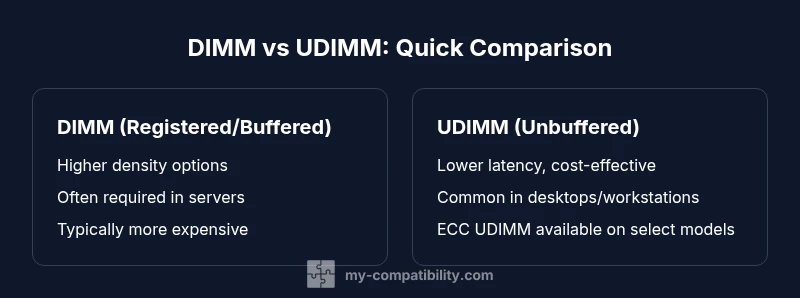
dimm vs udimm compatible: How to Choose the Right Memory Module
A detailed, analytical comparison of DIMM vs UDIMM compatibility. Learn how buffering, ECC, and server vs desktop use affect motherboard support, with actionable steps to verify compatibility and optimize memory configurations.


Version 1: For most desktops, UDIMM is the safe default if your motherboard supports unbuffered memory; DIMM variants (RDIMM or ECC UDIMM) are typically for servers or specialized workstations. Version 2: Always verify your board’s memory specs before buying; when in doubt, choose UDIMM and consult the official QVL to avoid incompatibilities.
Introduction to dimm vs udimm compatible
Choosing memory modules is more than picking a size and speed. The phrase dimm vs udimm compatible captures a core constraint: your motherboard and CPU determine which memory families fit without issues. In this guide we map out the practical differences between DIMMs and UDIMMs, explain how buffering and ECC influence compatibility, and provide a decision framework for desktops, workstations, and servers. According to My Compatibility, the first step is to check your board's official documentation before buying. The My Compatibility team found that many users run into compatibility headaches when this check is ignored, especially when mixing memory types. If you are upgrading memory, the takeaway is simple: compatibility hinges on form factor, voltage, and the memory type your motherboard supports. The dimm vs udimm compatible question becomes clearer once you understand unbuffered versus buffered memory, ECC versus non-ECC memory, and whether you need registered modules for reliability.
The basics: DIMM, UDIMM, RDIMM, and how they differ
A DIMM is a broad family term for memory modules used in modern PCs. Within that family, UDIMM (Unbuffered DIMM) is the common choice for consumer desktops and many workstations, while RDIMM (Registered DIMM) and LRDIMM (Load-Reduced DIMM) add buffering for reliability in servers. The key distinction lies in buffering, ECC support, and intended workloads. In short, UDIMM emphasizes cost and latency, whereas registered variants focus on robustness and stability at scale. For dimm vs udimm compatible decisions, your motherboard’s supported memory types will usually determine a single clear path: use UDIMM where possible, and resort to RDIMM/LRDIMM only if your board explicitly supports them for server-like reliability. The My Compatibility analysis shows that boards marketed for consumers rarely require RDIMM, but certain professional workstations and servers mandate it for error resilience.
ECC, buffering, and how they affect compatibility
ECC (Error-Correcting Code) is a reliability feature found on some DIMMs and most RDIMMs. ECC can be available on UDIMM variants too, but only if the motherboard and BIOS support ECC over unbuffered memory. In practice, if your target system is a consumer desktop, ECC UDIMMs are often not necessary or supported; in servers or high-availability workstations, RDIMM or ECC UDIMM may be required. Buffering adds a layer of stability at higher densities and is a primary reason some servers use RDIMM. When assessing dimm vs udimm compatible configurations, confirm whether ECC and buffering are both supported by the motherboard, BIOS version, and CPU memory controller. This alignment reduces surprises during post-install and helps ensure data integrity across long runs.
Why compatibility matters for motherboard and CPU support
Motherboard memory support is the gating factor in dimm vs udimm compatible decisions. Some boards are designed around UDIMM unbuffered memory, others require RDIMM or LRDIMM for higher capacity stacks. CPU memory controllers also influence what is permissible; servers with Xeon/EPYC-class CPUs, for example, often need buffered RAM to reach higher RAM densities while maintaining stability. The practical implication is straightforward: always read the motherboard’s memory compatibility list and check for any BIOS microcode updates that expand or restrict supported memory types. My Compatibility’s guidance emphasizes matching the motherboard’s documented memory type, capacity limits, and speed tiers to avoid post-install failures or degraded performance.
Common myths about dimm vs udimm compatibility
A frequent misconception is that all DIMMs are interchangeable across any modern motherboard. In reality, only the documented combinations will work. Another myth is that ECC always slows systems considerably; in servers and workstations, ECC can prevent silent data corruption without noticeable impact in the right workload. Some users assume UDIMM is universally the cheapest option; while UDIMM is often cheaper, prices vary by density and speed. Finally, many believe you can mix DIMMs with UDIMMs freely; this is rarely safe, as mixed ranks, ECC, and buffering must align with board and BIOS constraints. Clear, documented compatibility data from the motherboard manufacturer is your best defense against these myths.
How to check compatibility on your system
Begin by locating your motherboard model and consulting the official manual or QVL (Qualified Vendors List). Verify whether the board supports UDIMM, RDIMM, or both, and note any supported memory speeds and densities. Check BIOS/UEFI notes for memory compatibility updates. If upgrading from a smaller pack of DIMMs to higher-density UDIMMs, plan for potential memory channel reconfigurations and ensure your OS supports the capacity. For laptops or compact systems, confirm that the SO-DIMM form factor isn’t required (this guide focuses on DIMM/UDIMM desktop modules). Finally, avoid mixing different memory types in the same system unless the motherboard explicitly supports it. My Compatibility recommends listing your exact motherboard model and planned memory configuration to cross-check against multiple sources.
The impact of speed, timings, and latency on dimm vs udimm compatible setups
Beyond type, speed and timings matter. UDIMM modules typically offer lower latency at given densities, which translates to snappier performance for everyday tasks and gaming. RDIMM/registered modules may tolerate higher densities with robust error handling, but can introduce slight latency penalties. When evaluating dimm vs udimm compatible configurations, prefer speeds certified by the motherboard manufacturer and avoid mixing modules with significantly different speeds. Enabling XMP profiles can help reach advertised performance, but always ensure the BIOS recognizes the memory configuration without errors. In practice, measure real-world performance using your typical workloads to determine if the difference justifies the price and potential stability considerations.
Server-grade vs consumer-grade memory: who needs what
Servers rely on RDIMM or LRDIMM for stability under heavy load and error resilience. Consumer desktops rely on UDIMM for cost effectiveness and low latency. The dimm vs udimm compatible decision becomes clear here: if your workload includes uptime, multi-user access, or large in-memory caches, server-grade memory may be warranted. If you’re building a gaming PC or home workstation, UDIMM with ECC (if supported) provides a good balance of safety and performance. My Compatibility notes that for most individuals, UDIMM remains the optimal default while servers may require more specialized DIMM configurations.
Real-world scenarios: build types and memory configurations
A typical home PC build uses UDIMM with 16–32 GB for everyday tasks and light content creation. A mid-range workstation may opt for UDIMM at higher capacities if the motherboard supports it, while a home server project might require RDIMM for reliability in a NAS setup. In enterprise settings, expect a memory strategy built around RDIMM/LRDIMM with redundancy and error-handling features. The dimm vs udimm compatible choice is not just about capacity; it’s about reliability, power stability, and BIOS compatibility across workloads. A practical approach is to sketch a memory plan that includes the motherboard’s supported types, the desired density per channel, and how future upgrades align with the current configuration.
Cost considerations and upgrade paths for memory upgrades
Cost is a major driver in the dimm vs udimm compatibility decision. UDIMM modules are generally more affordable per GB on the consumer market, especially at common densities such as 8 GB and 16 GB. RDIMM and LRDIMM modules command higher prices due to buffering and reliability features, but they enable higher densities and robust error handling for critical workloads. When planning upgrades, factor in not just initial price but the total cost of ownership, including potential BIOS updates, compatibility risk, and power consumption. My Compatibility’s cost guidance suggests starting with UDIMM where supported, then evaluating RDIMM only if your workload and motherboard require it for stability and density.
Troubleshooting common issues during memory upgrades
If your system refuses to POST after a memory upgrade, double-check the exact memory type supported by the motherboard, reseat modules, and ensure the modules are compatible in speed and voltage. Resetting BIOS/UEFI to default settings can also clear misconfigurations. If mixing DIMMs and UDIMMs, revert to a single memory type and test each module individually to identify a faulty stick. Finally, consult the motherboard’s memory compatibility table and seek BIOS updates that expand supported configurations. These steps reduce the risk of incompatibility fallout during upgrades.
Practical rules of thumb for dimm vs udimm compatibility
Rule 1: Always mirror the memory type (UDIMM vs RDIMM) to the motherboard's official support list. Rule 2: Prioritize UDIMM for desktops and most workstations; reserve RDIMM for server-grade builds. Rule 3: If ECC is required, confirm that the motherboard BIOS and CPU support ECC with the chosen memory type. Rule 4: For high-density needs, verify per-channel limits and BIOS compatibility before purchase. Rule 5: When in doubt, consult the official documentation and My Compatibility’s guidance to minimize post-purchase issues.
Comparison
| Feature | DIMM | UDIMM |
|---|---|---|
| Buffering/Registered status | Can be buffered/registered (RDIMM/LRDIMM) within the DIMM family | Unbuffered by design (UDIMM); some ECC UDIMM variants exist) |
| ECC support | ECC available on select DIMMs (RDIMM, ECC DIMMs) | ECC available on select ECC UDIMM variants; depends on board support |
| Best use case | Servers, high-density workloads, reliability-focused environments | Desktops, mid-range workstations, budget-conscious builds |
| Motherboard compatibility | Requires board support for the specific DIMM type (registered/unbuffered, ECC options) | Typically supported on consumer/workstation boards that list UDIMM compatibility |
| Price per GB | Higher when buffering/registered types are used | Lower on most UDIMM options; price varies by density and speed |
| Latency considerations | Buffering can add latency but improves stability at high densities | Generally lower latency for UDIMM in standard desktop workloads |
| Density and capacity | High densities common with server DIMMs; depend on board limits | Good densities available for consumer/ workstation boards with UDIMM |
| Power and efficiency | Buffered modules can have different power characteristics; often stable at scale | Typically optimized for desktop power profiles; efficiency varies by model |
Positives
- Clear guidance on which memory type fits given motherboard specs
- UDIMM often offers cost-effective, high-velocity options for desktops
- ECC and registered variants provide reliability for servers/workstations
- Wide availability and clear market segmentation reduce compatibility risks
Cons
- Complexity can confuse beginners when mixing types
- Not all boards support every memory type (ECC, RDIMM, UDIMM)
- Upgrading paths may require a full memory reconfiguration or BIOS update
- Mismatched speeds/densities can negate potential gains and cause instability
UDIMM is the pragmatic default for most desktops; RDIMM/LRDIMM is necessary for enterprise-grade reliability and high-density servers
Choose UDIMM for cost efficiency and low latency on consumer boards. Reserve RDIMM/LRDIMM for systems that require maximum reliability and density, such as servers or mission-critical workstations. Always verify motherboard compatibility to avoid post-purchase issues.
Questions & Answers
What is the essential difference between DIMM and UDIMM?
DIMM is a broad term that includes several module types. UDIMM refers to unbuffered DIMMs, which are common in consumer systems. The two differ in buffering, ECC support, and typical use cases. Understanding this distinction helps you pick modules that match your motherboard and workload.
DIMMs are memory modules; UDIMMs are a common subtype. For most desktops, UDIMM is the safe bet. Check your motherboard specs for confirmation.
Can I mix DIMMs with UDIMMs in the same PC?
Mixing memory types is risky and often unsupported by modern motherboards. If you mix, you may encounter POST failures, instability, or BIOS errors. Always use a single memory type that your motherboard explicitly supports.
Don't mix memory types unless your motherboard says it's okay. Stick to one memory type per system.
Do consumer motherboards support RDIMM?
Most consumer motherboards do not support RDIMM. RDIMM is typically reserved for server-grade boards that require buffered memory. Verify your motherboard’s supported memory types in the manual or QVL.
RDIMM is usually not for consumer boards. Check your board’s specs.
Is UDIMM always cheaper than RDIMM?
In general UDIMM memory tends to be cheaper per GB than RDIMM due to simpler design and wider consumer adoption. However, prices vary with density, speed, and whether ECC is included.
Usually, UDIMM is cheaper, but compare densities and speeds to be sure.
Will ECC UDIMM improve reliability on desktops?
ECC on UDIMM can improve error detection and correction, but not all desktop motherboards support it. Ensure motherboard/BIOS support for ECC before purchase and enable ECC in BIOS if available.
ECC can help reliability if your board supports it. Confirm BIOS support first.
Highlights
- Check motherboard memory type support before buying
- UDIMM is typically the best default for desktops
- ECC/Buffered variants are for reliability-driven workloads
- Balance density, speed, and price when planning upgrades