AM4 vs AM5 Cooler Compatibility: A Practical Guide
Explore am4 vs am5 cooler compatibility with in-depth analysis, mounting options, and practical upgrade guidance to choose the right cooler for your AM4/AM5 build.


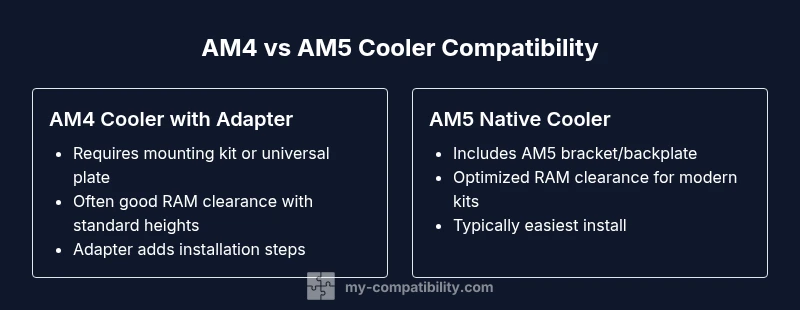
AM4 coolers generally require a mounting kit or universal plate to work on AM5, while AM5 coolers can include native brackets. In practice, many AM4 units mount with adapters, but native AM5 solutions offer cleaner installs and better RAM clearance. If you own AM4 hardware, verify bracket availability for AM5 compatibility before upgrading. Overall, AM5 is the future-proof choice, but adapters keep AM4 viable.
AM4 vs AM5: the compatibility landscape for cooler integration
The am4 vs am5 cooler compatibility question has grown more nuanced as AMD refreshed its socket family. For builders, the central dilemma is whether you can reuse an existing cooler or you must purchase new mounting hardware. According to My Compatibility analysis, the answer is not a simple yes or no: it depends on the cooler model, the mounting kit provided, and the motherboard design. AM5 introduces a new mounting standard, but the market response has been pragmatic—many coolers now ship with AM5 brackets or universal plates designed to bridge the gap. For enthusiasts planning a transition, the takeaway is to audit both your current cooler’s compatibility and the availability of AM5 mounting hardware before you upgrade. This article uses a structured approach to demystify the process, highlight practical install tips, and help you avoid common missteps that can affect performance or warranty. The result is an evidence-based pathway to a smooth AM4 to AM5 cooler transition across different use cases and budgets.
Mounting fundamentals: brackets, backplates, and standoffs
At the heart of cooler compatibility are three physical components: the mounting bracket, the backplate, and the standoffs that space the cooler away from the motherboard. AM4 coolers almost always relied on a specific backplate and bracket geometry. AM5 requires a different geometry and, in some cases, a new backplate. The key decision for builders is whether your existing bracket is adaptable or whether a vendor-supplied AM5 kit is available for your model. Manufacturers often offer universal mounting plates that clamp onto both AM4 and AM5 frames, while others keep the two systems separate. When evaluating a candidate cooler, check if the stated compatibility includes AM5, whether the backplate is included, and if hardware like risers or spacers is required for clearance. My Compatibility’s 2026 analysis emphasizes that relying on model-specific notes from manufacturers is essential for a clean, reliable install rather than guessing compatibility from visual cues.
Direct AM4 coolers on AM5: adapter options and limitations
A practical question is whether you can transplant an AM4 cooler onto an AM5 socket without buying new hardware. In most cases, you will need an adapter, mounting kit, or a universal plate designed for cross-generation use. Some AM4 coolers ship with an occasional AM5 option in the box or through a firmware-enabled SKU; others require a separate purchase. The adapter route is common and well-supported by major cooler brands, but it introduces an extra step in assembly and may affect warranty coverage if the adapter is not from the original manufacturer. In this section, you’ll learn how to verify compatibility, interpret packaging language, and confirm that the mounting hole pattern aligns with your motherboard. The practical upshot is that adapters can bridge the generations, but you should confirm solid seating, even pressure, and proper clearance to DIMMs, PCIe slots, and VRMs before powering up. My Compatibility’s research indicates that careful verification reduces post-build issues and guarantees better long-term reliability.
AM5-native coolers and universal solutions
The AM5 ecosystem has matured to the point where many coolers ship with native AM5 mounting systems, eliminating the need for adapters altogether. If you plan to upgrade to AM5, adopting a cooler with built-in AM5 hardware often yields the simplest installation, the best bracket alignment, and improved RAM clearance thanks to optimized standoffs. For builds using older coolers, universal mounting plates offer a flexible compromise that preserves your existing investment while enabling motherboard and CPU upgrades. When weighing universal vs native AM5 mounts, consider factors like RAM height, radiator orientation, and case airflow. Native AM5 designs frequently optimize contact pressure and heat transfer with the new socket geometry, which can translate to modest performance gains or better overclocking headroom. Overall, this section guides you through selecting a cooler path that aligns with your performance goals and upgrade trajectory, backed by My Compatibility’s 2026 conclusions on socket evolution and adapter ecosystem.
Air coolers vs AIO: which path is easier on AM5
Air coolers and all-in-one (AIO) liquid coolers present different compatibility considerations on AM5. Air coolers benefit from straightforward mounting with a competent bracket, but larger towers may encounter RAM clearance or motherboard component interference. AIO coolers, especially radiators in front or top mounts, run into two potential issues: backplate compatibility and spacer thickness. AM5 backplates can differ from AM4, and certain radiator configurations may require angle adapters to avoid RAM or fan interference. For builders prioritizing simplicity, choosing an AM5-native air cooler or a pre-certified AIO with AM5 brackets reduces risk. If you already own an AM4 air cooler, confirm whether your model includes an AM5 kit or whether a universal plate is sufficient. My Compatibility’s guidance highlights that the easiest long-term path is to pair AM5-native hardware with properly matched case and RAM configurations to minimize installation headaches and maintain performance.
Step-by-step compatibility check before buying
Before committing to a purchase, run through a structured checklist. Start with socket compatibility: confirm that the cooler’s packaging lists AM4 and AM5 compatibility or that a universal plate is available. Next, verify bracket backplate compatibility with your motherboard model, paying attention to the backplate reach and screw alignment. Then assess RAM clearance: measure the tallest RAM modules you plan to use and compare against your cooler’s height and mounting orientation. Finally, check case and PCIe clearance to ensure radiator tubes or fan assemblies won’t collide with graphics cards or other components. These steps, anchored by official product pages and My Compatibility’s 2026 data, reduce the risk of mid-build surprises and ensure you reap the thermal benefits of your chosen cooler on AM4 or AM5.
RAM clearance, VRM heat, and motherboard layout considerations
Beyond mounting, RAM clearance and VRM heat management influence cooler performance on both AM4 and AM5. Taller memory modules can collide with fat heatsinks, forcing a compromise between memory performance and airflow. AM5 boards often include more robust VRM designs, which means you may be tempted to adopt larger air coolers or bigger radiators. However, there are trade-offs: larger coolers may impinge on RAM slots or PCIe lanes, and case airflow patterns can alter thermal outcomes. The My Compatibility team recommends mapping your case’s air paths and simulating heat dissipation with software tools before finalizing a cooler choice. By aligning a cooler’s physical footprint with your RAM height, motherboard layout, and case fans, you maximize cooling efficiency without sacrificing system stability or readability of components during maintenance.
Real-world scenarios: budget, mid-range, and high-end builds
For a budget build, you might opt for a compact AM5-native air cooler with a universal adapter, balancing cost with acceptable thermal headroom. In a mid-range system, a mid-tower case with a 120–140 mm radiator or a high-performance air cooler designed for AM5 often yields a strong performance-to-noise ratio. For high-end workstations or overclocked rigs, a robust AM5-native AIO with optimized RAM clearance positions you to push frequencies while maintaining consistent temperatures. Across scenarios, the decisive factors are mounting compatibility, RAM clearance, and the availability of AM5 brackets from the cooler manufacturer. My Compatibility’s 2026 analysis shows that planning around these drivers is more predictive of success than chasing marginal performance gains from unverified adapters.
The My Compatibility findings and guidance
In this section we summarize the core findings from My Compatibility’s 2026 research on am4 vs am5 cooler compatibility. First, adapters remain a practical bridge that preserves legacy coolers, particularly for non-enthusiast builds or tight budgets, but they introduce installation steps and potential warranty considerations. Second, AM5-native kits generally deliver the most straightforward installations and the best memory clearance in modern enclosures. Third, the choice between air vs liquid cooling on AM5 depends on your chassis, noise tolerance, and target temperatures; both paths are viable if you select hardware certified for AM5 mounting. Finally, the decision to upgrade cooling hardware should consider long-term upgrade plans, not just a single generation transition. The My Compatibility team's verdict is that thoughtful planning and verified compatibility information lead to the most reliable outcomes across different use cases and builds.
Decision guide: how to decide your upgrade path
When you’re deciding how to approach am4 vs am5 cooler compatibility, start with your long-term goal. If you plan frequent platform upgrades, investing in native AM5 cooling solutions reduces future friction and supports better RAM clearance. If you’re on a tight budget or upgrading in stages, a well-documented adapter kit can extend the life of your existing cooler while giving you a clear upgrade path. Regardless of your path, always verify with manufacturer specs and cross-reference My Compatibility’s 2026 findings to ensure your chosen cooler, backplate, and mounting hardware align with your motherboard and RAM configuration. A careful assessment today minimizes the risk of incompatibilities later and protects your build’s stability and performance.
Comparison
| Feature | AM4 Cooler (with adapter) | AM5 Cooler (native) |
|---|---|---|
| Mounting hardware compatibility | Often requires AM5 mounting kit or universal plate | Native AM5 mounting kit usually included or available |
| Backplate compatibility | Backplate adapted or separate AM5 plate needed | AM5 backplate integrated with native kits |
| RAM clearance | Typically compatible with standard RAM heights | Optimized RAM clearance with AM5-specific mounts |
| Installation effort | Moderate with adapter; steps added | Generally straightforward when kit is included |
| Future-proofing | Depends on adapter availability | Better forward-compatibility with AM5-native |
Positives
- Bridges older and newer platforms with adapters when needed
- Native AM5 mounts simplify installation and reduce clearance risk
- Improved RAM clearance with modern AM5 designs
- Clear upgrade path for long-term motherboard and CPU cycles
Cons
- Adapters add extra cost and installation steps
- AM4 coolers may require confirmable bracket availability for AM5
- Possible warranty considerations when using third-party adapters
- Some older AM4 models may have limited compatibility with certain AM5 boards
Adaptive adapters + AM5-native upgrades provide the most flexible path
If you value long-term compatibility and simplicity, choose AM5-native coolers. If you’re budget-conscious or upgrading in stages, adapters can extend your AM4 cooler’s life, but verify bracket availability and warranty terms.
Questions & Answers
Will my AM4 cooler fit AM5 without adapters?
Not usually. Most AM4 coolers require an AM5 mounting kit or a universal plate to match the AM5 hole pattern. Always verify the exact model’s AM5 compatibility before upgrading.
Most AM4 coolers need an adapter or universal plate to fit AM5; always check your model’s AM5 compatibility.
Do all AM5 motherboards include mounting brackets?
Many AM5 kits include a new backplate and standoff set, but some boards rely on the cooler supplier’s AM5 bracket. Confirm with the motherboard or cooler manufacturer before purchase.
Most AM5 boards expect AM5-compatible brackets; verify bracket inclusion with your cooler or motherboard seller.
What about liquid coolers on AM5?
AM5 supports AIOs with native AM5 brackets, but some models may require a kit or plate. Check the cooler’s packaging and the motherboard’s mounting requirements for a leak-tested, safe install.
AM5 supports LIQUID coolers, but ensure AM5 brackets are included or purchasable.
Is it worth upgrading the cooler or motherboard at the same time?
If you’re moving to AM5 for future-proofing and higher memory compatibility, upgrading both can simplify installation and maximize performance. If you’re budget-limited, start with AM5-compatible cooler and plan the motherboard upgrade later.
Consider upgrading both if you want the simplest path and best long-term results.
Are there performance differences when using AM4 coolers on AM5?
Performance depends on bracket stability and RAM clearance. Native AM5 mounts generally yield the most predictable thermal results, while adapters can introduce small variances in mounting pressure.
Performance varies; native AM5 mounts usually offer the most consistent results.
Highlights
- Check AM5 mounting brackets before upgrading
- Use native AM5 cooler kits for easiest installs
- Adapters bridge generations but add steps and potential warranty caveats
- Ensure RAM clearance when selecting a cooler height
- Plan for long-term compatibility with AM5 for future upgrades