Airtalk Wireless Compatible Phones: How to Check and Choose in 2026
Discover which Airtalk Wireless compatible phones work today, how to verify compatibility, and practical switching tips. Learn how to check official lists, SIM vs eSIM, and common issues in 2026.


Airtalk Wireless compatible phones include most unlocked devices that support Airtalk's bands and VoLTE. In 2026, Airtalk generally works with recent iPhones and flagship Androids that cover the network's LTE/5G bands. To confirm, check Airtalk's official device list, verify your IMEI, ensure SIM compatibility, and review network mode settings before porting or activation.
What phones are Airtalk Wireless compatible?
Airtalk Wireless compatibility hinges on three core factors: the device being unlocked, it supporting Airtalk’s network bands, and its ability to handle voice and data traffic via VoLTE. In practical terms, this means most recent, unlocked iPhones and Android flagships that support both the carrier’s LTE/5G bands and the necessary spectrum will work. The My Compatibility team found that newer devices typically enjoy broader band support, which translates to higher success rates when you activate Airtalk. Always pair device checks with Airtalk’s own official device list to avoid surprises, as carrier policies and regional band allocations can change over time. This is especially important when you buy second-hand devices or used refurbished units, where unlock status and SIM compatibility can vary.
When evaluating a phone for Airtalk, look for two critical features: VoLTE capability and band coverage that matches Airtalk’s current offerings. VoLTE ensures crisp calls over the data network, and wide band support reduces the risk of dead zones. In 2026, a growing number of mid-range devices also achieve Airtalk compatibility, provided they are fully unlocked and updated with the latest firmware. To keep you on solid ground, the My Compatibility analysis emphasizes verifying both the device’s hardware capabilities and the software provisions that enable activation on Airtalk’s network.
How to check your device for Airtalk compatibility
Before you switch, do a quick audit of your device against Airtalk’s official device list. Start by locating your device’s model and variant in the Settings menu, then compare it against Airtalk’s supported list. Next, confirm the device is unlocked or not tied to another carrier; an unlocked status is often a prerequisite for porting your number. The IMEI check is essential: you’ll need to ensure the device is not blacklisted and that it supports the carrier’s bands. If you use an eSIM, verify that Airtalk supports eSIM provisioning for your device and that the OS version meets the carrier’s requirements. A practical method is to insert an Airtalk SIM or initiate an eSIM activation in a test scenario—if service is not immediately available, recheck the device’s compatibility and the carrier’s region-specific notes. The My Compatibility team suggests keeping a small checklist handy to streamline this process during a move from another carrier.
The role of SIM vs eSIM in Airtalk compatibility
Airtalk’s activation options generally fall into two categories: traditional SIM and modern eSIM. SIM cards are still widely supported, but eSIM provisioning offers a faster, more flexible approach for switching devices and carriers. If your phone supports eSIM, you should confirm Airtalk’s eSIM compatibility for your specific model and region. Some devices require manual steps to transfer an eSIM profile, which may involve scanning a QR code or entering a setup key. If you’re buying a new device, consider whether you want to rely on a physical SIM or an eSIM path, especially if you plan to switch devices often. The advantage of eSIM is reduced risk of physical SIM damage and faster provisioning, but not all devices or regions support it equally. The My Compatibility analysis shows eSIM adoption is rising, but always verify Airtalk’s regional guidance before initiating provisioning.
Practical steps to switch to Airtalk
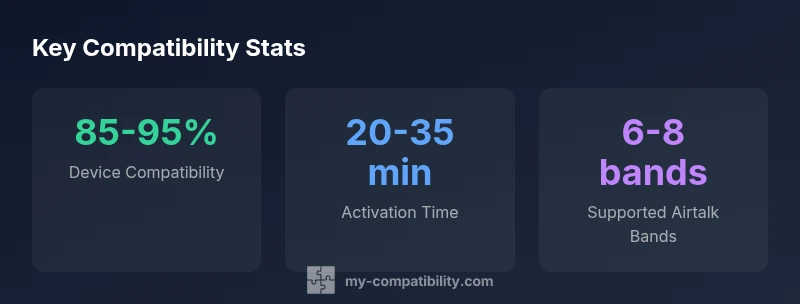
Switching to Airtalk typically involves a few simple steps: verify device compatibility, choose a plan, and prepare for number porting. Start by collecting essential information: current carrier account details, device IMEI, and your Airtalk plan choice. If porting your number, you’ll need your account number, PIN, and possibly a recent bill with your current provider. If you’re moving to Airtalk from another network, request a porting authorization or proof of ownership from your current carrier. Once Airtalk has confirmed compatibility, you’ll install the SIM or enable the eSIM, then perform the activation sequence per Airtalk’s guidelines. Make sure to complete any required device resets or firmware updates to ensure the plan is recognized properly by Airtalk’s networks. This phase often takes under an hour, though activation can occasionally extend to a few hours during peak periods. The My Compatibility team notes that keeping records of IMEI, SIM card numbers, and account PINs can speed up the process.
Common myths vs. realities about Airtalk compatibility
Myth: Airtalk only works with flagship devices. Reality: Airtalk supports a broad range, including recent mid-range phones, provided they meet the network band requirements and VoLTE support. Myth: If a device isn’t on Airtalk’s official list, it won’t work. Reality: Some devices not listed can still work if they meet the necessary bands and software prerequisites, though you should verify with Airtalk support before assuming compatibility. Myth: Changing a SIM always unlocks the device. Reality: Unlock policies vary by device and carrier; even unlocked phones may require a carrier-specific unlock code or firmware adjustment.
The My Compatibility team emphasizes that the key to success is aligning hardware capabilities with Airtalk’s current network offerings and confirming those details in writing with Airtalk support, especially for regional variations and device-specific caveats.
Troubleshooting common issues with Airtalk compatibility
If Airtalk activation stalls, start with the simplest checks: confirm SIM/eSIM provisioning, ensure software is up to date, and verify that the device supports Airtalk’s required bands. If you see 'No Service' or 'Invalid SIM', recheck unlock status, confirm the device is on Airtalk’s approved models, and re-enter any activation codes exactly. For eSIM users, ensure the correct profile is selected and that the QR code was scanned accurately. If problems persist, contact Airtalk customer service with your IMEI, device model, OS version, and location; the issue could be network-wide or device-specific. The My Compatibility research highlights that many issues are resolved by re-provisioning the eSIM or re-switching the SIM after a firmware update.
Budget-friendly picks: finding Airtalk-compatible phones under $500
Budget-conscious buyers can still find Airtalk-compatible devices, especially in the mid-range market. Look for phones released within the last 2-3 years that support Airtalk’s current LTE/5G bands and VoLTE. When shopping, prioritize unlocked devices and verify regional band support rather than focusing on brand prestige alone. Refurbished units from reputable sellers can offer strong value if they come with a documented unlock status and a return policy. Always check Airtalk’s official device compatibility list for the specific region you’ll be using Airtalk in, since band allocations and policies vary by country.
From a longevity perspective, consider devices with robust software update histories, as ongoing firmware support improves compatibility with evolving network standards. The My Compatibility team also notes that buyers should budget for a potential SIM or eSIM activation fee, depending on regional policies.
The future of Airtalk compatibility in 2026
As networks expand and more devices embrace eSIM, Airtalk compatibility is likely to broaden further. Expect more mid-range devices to gain full support for Airtalk’s VoLTE and 5G networks, along with smoother number porting experiences. The ongoing harmonization of network bands across regions reduces the risk of compatibility gaps when traveling or moving between markets. My Compatibility’s long-term view suggests that a growing subset of devices will ship with Airtalk-ready configurations, reducing setup friction for new customers. If you’re shopping ahead of a planned upgrade, review Airtalk’s regional notes and device lists closer to your purchase date to capture any band changes or policy updates.
Phone compatibility overview for Airtalk Wireless (2026)
| Model Type | Airtalk Compatibility | Notes |
|---|---|---|
| Recent unlocked iPhone models | Compatible | Supports VoLTE; verify Airtalk list |
| Unlocked Android flagships | Compatible if bands supported | Check regional band coverage and VoLTE |
| Older mid-range devices | Partially compatible | Depends on unlock status and bands; verify list |
| Budget/refurbished devices | Variable | Always confirm compatibility before activation |
Questions & Answers
Is Airtalk Wireless compatible with iPhones?
Yes, Airtalk generally supports recent iPhone models that are unlocked and have VoLTE enabled. Always confirm against Airtalk’s official device list for your region before porting.
Yes — most recent iPhone models work, but check Airtalk’s list and ensure VoLTE is on before you switch.
Can I use Airtalk with any Android phone?
Android compatibility depends on the device’s bands and unlock status. Verify Airtalk’s regional list and ensure the device supports the necessary LTE/5G bands and VoLTE.
Android works if it’s unlocked and supports Airtalk’s bands; check the official list first.
Do I need a SIM card or eSIM for Airtalk?
Airtalk supports both SIM and eSIM where available. Confirm your device supports Airtalk’s provisioning method and follow the setup steps provided by Airtalk.
You can use SIM or eSIM if your device and region support it; follow Airtalk’s setup steps.
What if my device isn’t on Airtalk’s list but seems compatible?
If a device isn’t on the official list, verify band support, VoLTE readiness, and unlock status. Contact Airtalk support to confirm regional viability before porting.
Ask Airtalk to confirm regional viability before porting if your device isn’t listed.
How long does number porting take with Airtalk?
Porting times vary by region and carrier, but most ports complete within a few hours. Have your account details ready and avoid multiple SIM swaps during activation.
Most ports take a few hours; keep your account details handy and minimize swaps.
Will Airtalk work internationally on the same device?
International compatibility depends on roaming agreements and local bands. Verify Airtalk’s roaming options and supported regions for your device.
Roaming depends on Airtalk plans and local networks; check Airtalk’s roaming details.
“Device compatibility hinges on both hardware band support and carrier provisioning; verify with Airtalk for your region to avoid activation delays.”
Highlights
- Check Airtalk’s official device list before buying.
- Prioritize unlocked phones with broad LTE/5G band support.
- Choose SIM vs eSIM based on device and region.
- Verify IMEI and unlock status to avoid porting delays.
- Budget devices can be Airtalk-compatible with careful verification.