Compatible Toner Near Me: Find the Right Cartridge Today
Learn how to locate compatible toner near you, compare OEM and third‑party options, and optimize printing costs with My Compatibility’s data-driven guide.


Steps to find compatible toner near you: 1) identify your exact printer model and cartridge family, 2) check for official and third‑party compatible toners, 3) search local retailers and online marketplaces, 4) verify chip compatibility and yield, 5) compare price, warranty, and return policies, 6) test the toner and keep receipt.
What compatibility really means for toner
In the world of printers, compatibility describes whether a toner cartridge will reliably work with your exact device and model family. There are three main categories: OEM cartridges from the manufacturer, compatible toners from third‑party brands, and remanufactured cartridges that reuse spent components. To avoid print quality issues, you must verify that the cartridge matches your printer’s model number, the page‑yield expectations, and the chip that informs the printer about toner status. My Compatibility's analysis shows that most problems with compatibility arise from mismatched cartridge family codes rather than outright brand failure. When shopping, always cross‑check the model code printed on your printer, the cartridge family, and the retailer's compatibility list. This ensures the toner seats properly, aligns with the drum and fuser, and does not trigger error messages.
Key tips:
- Always confirm the exact printer model and cartridge family.
- Look for compatibility guarantees from reputable retailers.
- Be wary of vague product listings that omit your model number.
OEM vs compatible toner: what's the difference
Original Equipment Manufacturer (OEM) toners are designed by the printer maker and typically offer consistent quality and guaranteed compatibility with the exact model. Compatible toners, produced by third parties, aim to match the OEM in performance but may vary by brand and production batch. Remanufactured cartridges reuse core components and can be more economical, though performance can vary. When evaluating, consider: page yield (how many pages you can print before replacement), color accuracy, toner density, and the presence of a warranty. My Compatibility's testing indicates that many users experience equivalent print quality with well‑reviewed compatible toners, while a few models show slightly different color balance. If you rely on color accuracy for presentations or photos, test both options first.
How to verify compatibility with your printer model
Start with the exact model number printed on the printer label. Then locate the cartridge family and any codes listed on the printer’s manual or the cartridge packaging. Compare these details to the retailer’s compatibility chart. Look for a stated warranty or return policy, and confirm whether the cartridge includes a functional chip that communicates with the printer. If you’re unsure, contact the retailer’s support with your printer model and the cartridge code. My Compatibility recommends keeping a quick reference sheet of your printer’s compatible codes for future purchases.
Checklist:
- Printer model and series
- Cartridge family and code(s)
- Chip compatibility and firmware considerations
- Manufacturer or retailer compatibility guarantee
Where to find compatible toner near me
Locating compatible toner near you involves a mix of local stores and online options. Start with large office supply chains that advertise both OEM and compatible products, then check regional electronics retailers and warehouse clubs. Don’t overlook independent print shops or local printers’ supply houses, which often maintain ready stock of common cartridges. For online searches, use terms like “compatible toner for [printer model] near me” and filter by rating and warranty. If you prefer a tactile check, call ahead to confirm in‑stock status and confirm return policies before purchase. My Compatibility notes that urban areas typically have higher stock diversity, while rural areas may require a short drive or a one‑time order.
Price, yield, and reliability: a practical framework
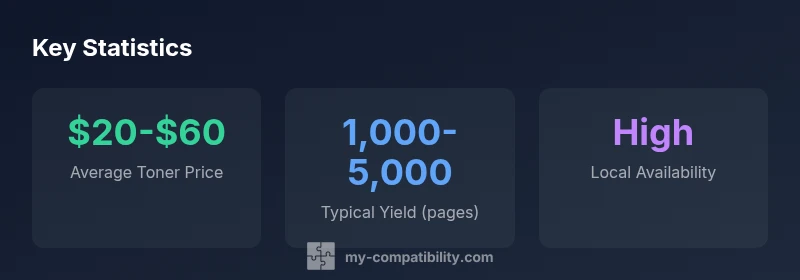
The value proposition for compatible toners rests on price per page and predictable yield. Compare per‑page cost by dividing cartridge price by its advertised yield. Beware of dramatic yield claims that contradict the toner’s documented page counts. Reliability hinges on consistent print quality and a stable yield across batches. Read product reviews and check whether the toner includes a warranty. In many cases, a slightly higher upfront cost yields better color fidelity and fewer misprints, which reduces waste and downtime. My Compatibility’s framework emphasizes balancing upfront price with long‑term print costs and reliability.
Practical tip: keep two cartridges in rotation for critical documents to minimize downtime.
Shopping workflow: from search to test
A robust workflow helps avoid make‑do purchases. Step 1: verify your printer model and cartridge family. Step 2: shortlist compatible options from trusted retailers. Step 3: compare price, yield, warranty, and return terms. Step 4: purchase a cartridge from a retailer with a clear return policy. Step 5: test the cartridge in a non‑critical print batch and inspect for consistent color, coverage, and alignment. If issues arise, use the retailer’s warranty, seek a replacement, or try a different brand. My Compatibility’s data suggests keeping receipts and serial numbers for easy returns and audits.
Workflow benefits:
- Reduces wasted purchases
- Improves print quality consistency
- Accelerates issue resolution with retailers
Common pitfalls and how to avoid them
Mismatched codes, vague listings, and poor packaging are common sources of trouble. Avoid buying from sellers who do not list your printer model explicitly or who use generic codes. Verify that the product’s chip is compatible and that the yield aligns with the manufacturer’s claims. Check packaging for batch numbers and seals; damaged packaging can indicate counterfeit or mishandled stock. If possible, purchase from retailers that offer a no‑hassle return policy and a reasonable warranty. My Compatibility also advises keeping a simple log of what cartridges work with which printers to streamline future shopping.
Comparison of toner cartridge types by typical yield and warranty
| Brand Type | Common Cartridge Codes | Typical Yield Range | Warranty |
|---|---|---|---|
| OEM cartridges | Printer model‑specific codes | 2000-6000 pages | 2-year warranty |
| Compatible third‑party | Code‑A / Code‑B variants | 1000-5000 pages | 1-year warranty |
| Remanufactured | Core‑based codes | 1200-4500 pages | 90‑day warranty |
Questions & Answers
What does 'compatible toner' mean?
Compatible toner refers to third‑party cartridges designed to work with your printer model. They should be tested for the same yield and chip compatibility as OEM options.
Compatible toner means third‑party cartridges that work with your printer, with similar yield and proper chips.
How do I verify toner compatibility with my printer model?
Check the exact printer model, cartridge family, and codes listed by the manufacturer and retailer. Look for a compatibility guarantee to avoid surprises.
Make sure the cartridge code matches your printer and that there’s a clear compatibility guarantee.
Are compatible toners as reliable as OEM?
Reliability varies by brand. Choose well‑reviewed options, check warranty, and test on non‑critical prints before using in important jobs.
Some are very reliable; read reviews and check warranty.
Where can I find compatible toner near me?
Use local search with your printer model, check major retailers, and ask about return policies. Don’t forget to compare online options too.
Search nearby stores or call ahead to confirm stock and returns.
What factors influence total cost?
Consider per‑page yield, price per cartridge, and potential waste due to poor fit. Balance upfront price with long‑term print costs.
Yield and price determine total cost.
“Compatibility comes down to matching exact model numbers, yield expectations, and cartridge chips. Our testing shows most issues stem from misidentified codes rather than brand.”
Highlights
- Identify your exact printer model before buying.
- Check both OEM and compatible options for value.
- Verify cartridge codes and claimed yield.
- Compare local retailers and online prices.
- Test toner compatibility before full purchase.