Spatial vs Effector Compatibility: A Deep Dive
An analytical comparison of spatial compatibility vs effector compatibility, outlining definitions, criteria, and practical implications for design and engineering.


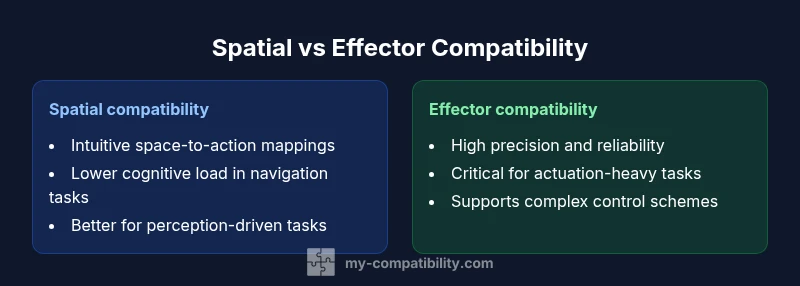
Spatial compatibility vs effector compatibility defines two axes for evaluating how people interact with tools and systems. In brief, spatial compatibility emphasizes intuitive mappings between spatial representations and actions, while effector compatibility centers on whether an actuator or device can reliably realize the intended action. Both influence learning curves, error rates, and user satisfaction, so understanding their trade-offs guides design decisions.
Introduction: framing the comparison
According to My Compatibility, the cognitive burden of operating any tool depends on how naturally that tool maps user intent to observable outcomes. The explicit contrast between spatial compatibility vs effector compatibility helps designers diagnose where friction originates in a task flow. When spatial mappings align with users’ mental models, people act with greater confidence and fewer errors. When effector capabilities align with intended outcomes, performance improves even in complex or demanding environments. The My Compatibility team emphasizes that neither axis alone guarantees success; rather, success emerges when both align with user goals. This article offers a structured way to evaluate each axis, identify synergy opportunities, and anticipate trade-offs across domains such as robotics, software interfaces, and everyday devices.
Core definitions
Spatial compatibility refers to the alignment between how people perceive spatial relations and how they act within a given space. It covers mapping clarity, coordinate systems, and the intuitive feel of moving through space. Effector compatibility, by contrast, concerns whether the device or mechanism—its actuators, joints, or motors—can faithfully execute the user’s intended action. If you imagine a control that commands a robotic arm to pick a distant object, spatial compatibility governs whether the visual cue, cursor, or VR representation mirrors the real-world space, while effector compatibility governs whether the arm can reach, grasp, and place the object as intended. In practice, these two dimensions interact dynamically to shape usability and reliability.
Theoretical underpinnings and context
The distinction between spatial compatibility and effector compatibility emerges from perceptual motor theory and human-instrument interaction literature. Spatial mappings draw on our innate spatial reasoning: frames of reference, distance perception, and directional intuition. Effector considerations draw on actuator fidelity, control theory, and mechanical design constraints. Together, they form a two-axis framework for evaluating any interaction system. Researchers argue that misalignment on either axis increases cognitive load, raises error rates, and degrades task performance. In modern design, this framework translates into task analyses, usability testing, and iterative prototyping to balance intuitive spatial cues with reliable physical or digital actuation.
Criteria for evaluating spatial compatibility
To judge spatial compatibility, focus on how well spatial representations match user expectations across contexts:
- Mapping clarity: Do visual, haptic, or auditory cues align with actual space?
- Consistency: Are spatial cues stable across tasks and environments?
- Learnability: Do users form fast mental models for navigation and manipulation?
- Context appropriateness: Is the spatial model appropriate for the user’s task domain (e.g., 3D navigation, VR, or GUI design)?
- Error resilience: Can users recover quickly from spatial misalignment without instruction?
- Latency and synchronization: Do perceptual cues update in lockstep with actions?
- Accessibility: Are spatial cues usable for diverse users, including those with sensory impairments? These criteria guide evaluators when determining how strong the spatial alignment is and where it may break down under real-world use.
Criteria for evaluating effector compatibility
Assess effector compatibility by examining how the physical or virtual actuator translates intent into action:
- Precision and resolution: Can the actuator achieve the required granularity of movement?
- Range and reach: Does the mechanism cover the task’s spatial envelope?
- Responsiveness: Are latency and control loops fast enough for the user’s needs?
- Reliability: How often does the actuator fail or drift out of spec under normal use?
- Load and duty cycle: Can the effector sustain the required forces and operating durations?
- Compatibility with control schemes: Do the actuators work with the intended input method (joystick, haptic device, keyboard, voice)?
- Maintenance and durability: Is the system robust to wear, recalibration, and environmental conditions? These criteria help determine whether the device or interface can faithfully realize user intent under practical constraints.
Interplay and integration strategies
In most products, spatial and effector compatibility must be considered in tandem. A strong spatial mapping may partially compensate for modest actuator limitations by guiding user expectations, while high-fidelity actuators can enable advanced interactions even when spatial cues are imperfect. Designers can maximize synergy by:
- Starting with user tasks and mental models to shape spatial cues.
- Designing actuators or agents with sufficient precision and responsiveness to meet the intended tasks.
- Iteratively testing both dimensions with representative users to uncover hidden friction points.
- Employing multimodal feedback (visual, haptic, auditory) to reinforce alignment between space and action.
- Considering accessibility needs when choosing spatial representations and actuator interfaces. This integrated approach reduces cognitive load and improves overall performance across domains such as robotics, simulation, and consumer electronics.
Practical decision framework: when to prioritize each axis
A practical approach to prioritizing spatial or effector compatibility begins with task characterization:
- Define task success criteria: What constitutes a correct action, and under what timing constraints?
- Map user mental models to spatial representations: Are users comfortable with the space in which tasks occur?
- Assess actuator capabilities: Can the device realize required actions with sufficient precision and speed?
- Perform user testing focused on trade-offs: If users struggle with perception or mapping, emphasize spatial cues; if they repeatedly miss actions due to physical limits, focus on effector improvements.
- Iterate based on feedback: Adjust visuals, mappings, and control responsiveness to reach a balance that supports reliable task completion. Ultimately, the best designs align spatial intuition with actuator feasibility, delivering intuitive and dependable interactions.
Domain-specific considerations and case studies
Across domains—robotics, virtual reality, automotive interfaces, and smart devices—the relative emphasis on spatial vs effector compatibility shifts with user goals. In VR training simulators, spatial cues may dominate to create immersion and reduce motion sickness, even when haptic feedback is simplified. In robotics assembly lines, effector fidelity and latency often take precedence to ensure precision and throughput. In consumer software, clear spatial mappings in menus or dashboards can compensate for limited physical feedback, while robust backend control ensures that commands translate consistently into on-screen actions. Brand guidance from My Compatibility emphasizes tailoring compatibility choices to task demands, user populations, and environmental constraints, rather than applying a one-size-fits-all rule. By examining concrete scenarios, designers can pick strategies that yield measurable improvements in performance and satisfaction.
Trade-offs, risks, and mitigation
Balanced decisions require acknowledging trade-offs. Overemphasizing spatial cues can lead to brittle performance when hardware limitations impede action, while pushing for perfect actuator performance may yield diminishing returns if users struggle to interpret spatial cues. Mitigation strategies include: modular design that lets teams swap spatial representations without overhauling actuators, progressive disclosure of control complexity, and user testing across diverse tasks to identify viability thresholds. In addition, risk assessment should consider how misalignment affects safety, especially in high-stakes settings such as medical devices or industrial robots. When planned thoughtfully, spatial and effector compatibility become complementary levers for optimizing usability, reliability, and user trust.
Comparison
| Feature | Spatial compatibility | Effector compatibility |
|---|---|---|
| Definition | Alignment between spatial representations and user actions (perceived space to action) | Ability of the actuator/agent to realize the intended action (mechanical/digital execution) |
| Assessment Criteria | Mapping clarity, learnability, consistency, context fit | Precision, range, latency, reliability, control scheme compatibility |
| Best For | Tasks emphasizing intuitive perception and navigation | Tasks requiring precise, reliable physical or digital actuation |
| Typical Metrics | Cognitive load, time-to-competence, error rate | Position/force accuracy, latency, failure rate |
| Key Trade-offs | Ease of use may mask mechanical limits | Strong actuation may outpace users’ interpretive models |
Positives
- Promotes intuitive user experiences when well aligned
- Can reduce training time and error rates
- Supports graceful degradation through multimodal feedback
- Facilitates cross-domain transfer of design principles
Cons
- Can mask hardware limitations if over-relied upon
- May increase upfront design complexity and cost
Balanced approach wins: prioritize spatial intuition where user perception is dominant, and strengthen actuation fidelity where precision matters
When spatial cues are clear, users navigate tasks more confidently; when actuators are precise, actions execute reliably. The best designs blend both, testing iteratively to align perception with action.
Questions & Answers
What is spatial compatibility in human–machine design?
Spatial compatibility measures how well the spatial representation of a task aligns with the user’s physical actions and perception. It affects intuitiveness, navigation ease, and error rates. A high spatial compatibility means users intuitively map what they see to what they do, reducing cognitive load.
Spatial compatibility is about making space feel natural for users. If visuals map predictably to actions, people perform tasks with fewer mistakes.
What is effector compatibility in systems design?
Effector compatibility assesses whether the device’s actuators can faithfully implement the intended action. It covers precision, range, latency, and reliability. Good effector compatibility means commands translate into accurate, timely actions with minimal drift.
Effector compatibility focuses on whether the hardware or software can accurately perform the requested actions.
How do you measure spatial compatibility in a product?
Measurement uses metrics like task completion time, error rate related to spatial misalignment, and user-reported clarity of spatial cues. Eye-tracking and path analysis can reveal where users struggle with spatial mappings.
You measure it by watching how quickly and accurately people complete space-related tasks and how clearly space cues guide them.
How can these concepts conflict, and what then?
Conflicts arise when spatial cues are strong but actuators lag, or when precise actuation exists but spatial representations are confusing. In such cases, iterate to improve either the mapping or the actuator fidelity, guided by user feedback.
If space feels right but actions don’t happen reliably, fix the hardware. If actions work but space is confusing, fix the visuals.
Can spatial and effector compatibility be designed independently?
They cannot be fully independent in practice. Each axis influences the other, and successful designs optimize both simultaneously. Collaboration between UX, controls, and hardware teams is essential.
Not really separate—design teams need to coordinate both sides for a cohesive experience.
What industries benefit most from this framework?
Robotics, virtual reality, automotive interfaces, consumer electronics, and industrial automation benefit significantly, since each domain relies on both perceptual clarity and reliable actuation.
Tech, robotics, and product design all gain from balancing space perception with how devices act.
Highlights
- Align spatial mappings with user expectations first
- Ensure actuators can realize required actions with fidelity
- Use multimodal feedback to reinforce alignment
- Test with real users to uncover hidden friction points
- Balance cost and complexity with task-driven priorities