PS3 Backwards Compatibility: Timeline, Models, and What It Means Today
Explore the timeline of PS3 backwards compatibility, which models supported PS2 games, why Sony phased it out, regional variations, and how to verify your console today.


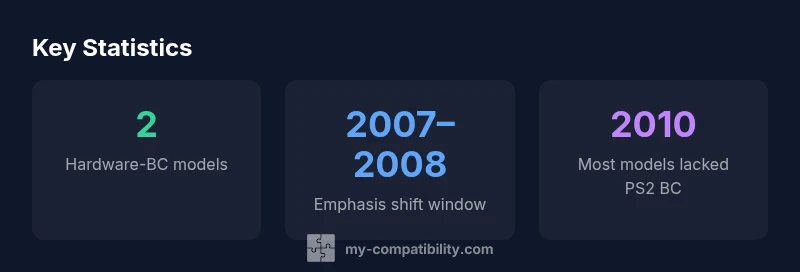
PS3 backwards compatibility was not removed in one instant. Sony gradually phased it out after 2007–2008 model revisions, and by around 2010 most consoles shipped without PS2 support. Early hardware-BC models like the 20GB and 60GB maintained PS2 compatibility, while later revisions relied on software or offered none at all.
Historical timeline of backward compatibility on the PlayStation 3
The PlayStation 3 entered the market with varying levels of backward compatibility. In the earliest days, certain models shipped with hardware-based PS2 backward compatibility. This meant that many PS2 discs could be played directly on those consoles without emulation. Over time, Sony shifted its approach as manufacturing costs and hardware constraints evolved. The company began to phase out full hardware PS2 compatibility in later model revisions, signaling a strategic shift away from the PS2-era feature set. The result was a mixed landscape: some early adopters enjoyed true compatibility, while many late adopters encountered PS2 games only via limited or no support.
Hardware vs. software BC: how it worked
Hardware backward compatibility relies on dedicated circuitry that mirrors the PS2’s Emotion Engine and Graphics Synthesizer. This approach preserves a high degree of compatibility with PS2 titles, including quirks and performance nuances that developers relied on. Software-based compatibility, by contrast, uses emulation or translation layers to run PS2 games, often with trade-offs in performance, framerate, or game behavior. When Sony moved away from hardware BC, the emphasis shifted toward digital distribution and legacy support in other forms, and many players had to rely on their original PS2 hardware for full compatibility.
Regional and model variations you should know
Because PS3 hardware revisions varied by region and release window, the presence or absence of PS2 backward compatibility could differ. Early, high-cost SKUs typically included hardware BC, while mid-life revisions gradually dropped it. In some regions, limited emulation or partial BC remained available for certain games, but this was never universal. If you’re buying used, checking the exact model number (for example, CECHA, CECHB, CECHExx families) is essential to determine whether PS2 games will run.
Why Sony phased out PS2 BC
There were several practical motivations behind phasing out PS2 BC. Cost and complexity of maintaining multiple hardware generations within a single console line increased production difficulty. Additionally, the PS2’s extensive library and user base still demanded attention, but the market pressure shifted toward newer software ecosystems, digital storefronts, and feature sets that did not rely on PS2 compatibility. The decision was framed as a move toward simplification and cost efficiency, with an eye toward future hardware and software strategies.
How to verify if your PS3 model supports PS2 games today
To confirm PS2 compatibility today, locate your PS3 model number (usually found on the back of the console or in system settings) and cross-reference it with vendor guides or manufacturer lists. If you own a very early model, you may still have hardware BC; otherwise, you’ll likely find no native PS2 support. In many cases, PS2 game availability today comes through alternative routes (digital re-releases, remasters, or using a PS2 console). If you’re a collector, verifying the model is the safest way to set expectations about playability.
Practical implications for collectors and retro gaming today
For collectors, the key takeaway is that the PS3’s PS2 compatibility is sporadic and model-specific. When evaluating a used PS3, prioritize models known for hardware BC if your goal is immediate PS2 game compatibility. If not, plan for a PS2 or a remastered/ported option for PS2 titles. The shifting landscape also means that many PS2 classics live on through re-releases or digital distribution on newer platforms, which can be a more reliable route for preservation and accessibility.
PS3 backward compatibility by model and region
| Model/Region | Backward Compatibility Status | Notes |
|---|---|---|
| 20GB (CECHA/CECHB) | Hardware PS2 BC | Original launch models; BC removed in later revisions |
| 60GB (CECHA/CECHE) | Hardware PS2 BC | Best BC coverage; later discontinued |
| 40GB/80GB (CECHxx) | None or limited BC | BC largely absent; region dependent |
Questions & Answers
Which PS3 models had PS2 backward compatibility?
Early hardware-BC models, notably some 20GB and 60GB SKUs, offered PS2 compatibility. As Sony revised the lineup, hardware BC was removed from most later models.
Early models had PS2 compatibility; newer ones generally do not.
Do PS3 Slim or later models support PS2 games?
Most Slim and later PS3 models do not include PS2 backward compatibility. Some regional variants may have had limited exceptions, but the general rule is no native PS2 support.
No; later PS3s usually lack PS2 compatibility.
Can I use software to play PS2 games on PS3?
There was no universal official PS2 emulator for modern PS3s. Compatibility was tied to hardware-based BC in early models and largely unavailable in later revisions.
There isn’t an official PS2 emulator for modern PS3s.
How can I check my PS3 model’s BC status?
Find the model number on the console and compare it against Sony’s documented BC lists or credible guides; this tells you whether PS2 games will run.
Check the model number against official lists to know BC status.
Is there a workaround to play PS2 games on PS3 today?
You can play PS2 games by using a PS2 console or looking for remasters/remakes in newer platforms. Native PS2 BC on PS3 is largely not available.
The easiest workaround is to use a PS2 or remastered versions.
Are PS2 games still available digitally for PS3?
Some PS2 titles were re-released or made available through digital stores or re-releases, but not all titles are available and it varies by region.
Look for remasters or digital re-releases for PS2 titles.
“The PS3 backwards compatibility story reflects Sony's evolving hardware strategy and market priorities; collectors should verify BC on any used unit before purchase.”
Highlights
- Verify model BC before relying on PS2 games
- Early PS3s offered hardware PS2 BC; most later models do not
- BC status varied by region and model
- By 2010, the majority of PS3s shipped without PS2 BC
- Consider alternative routes for PS2 games today