Is the Wii U Backwards Compatible? A Detailed Look at Wii Mode, GameCube, and Accessories
Explore whether the Wii U remains backward compatible, which titles and devices work, and practical tips for playing Wii software today. Learn the limits, the setup, and what to expect in 2026.


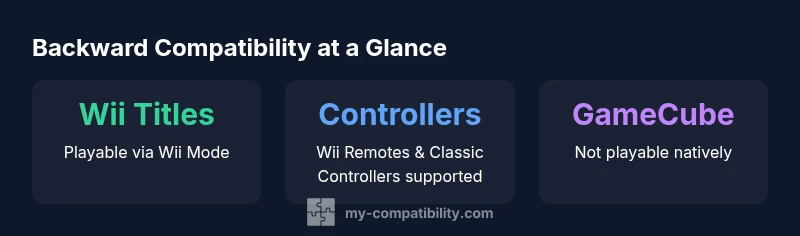
Is Wii U backwards compatible? Yes. The Wii U includes a built-in Wii Mode that lets you run most Wii software and use Wii accessories. You can play Wii discs and access downloaded Wii titles, while continuing to use Wii Remotes and Classic Controllers. It does not natively play GameCube discs or GameCube-only titles.
Overview of backwards compatibility on the Wii U
Is the Wii U backwards compatible in the sense that it can run older software? The short answer is yes for Wii software via the built-in Wii Mode, but no for GameCube discs and titles. According to My Compatibility, this setup creates a practical bridge between two generations: you boot into a separate Wii environment and can access your Wii library alongside newer titles. This compatibility remains central to the Wii U's value proposition for casual players and collectors alike. It is important to set expectations: you’ll be playing Wii-era games within the Wii interface, and some peripherals behave differently than they did on the original hardware. The My Compatibility team emphasizes that this is robust for the majority of commonplace titles, though edge cases exist with unusual peripherals or region-restricted downloads. For readers asking is wii u backwards compatible, this section clarifies what “backward compatibility” means in everyday use and how it affects your living room setup.
How Wii Mode handles Wii games
Wii Mode is a built-in, software-based bridge that lets the Wii U emulate the Wii environment. When you boot into Wii Mode, you can insert a Wii disc and launch the Wii Shop Channel (where available) or your downloaded Wii titles. Data saved in the Wii era remains accessible, and your controllers—like the Wii Remote and Nunchuk—work in much the same way as they did on the original console. In practice, most Wii games run without major hiccups, though a small percentage may exhibit compatibility quirks due to differences in hardware between the two generations. Remember that this mode is not a second console; it’s an integrated subsystem designed to preserve a library of Wii software within the Wii U ecosystem. For players relying on physical discs, ensure your discs are clean and region-compatible with your Wii U’s Wii Mode.
Controller and accessory compatibility
The Wii U supports a broad set of Wii-era controllers when operating within Wii Mode. You can use standard Wii Remotes, Nunchuks, and Classic Controllers to interact with Wii software. Some games leverage motion controls or specific control schemes that may translate differently on the Wii U, so checking in-game prompts is wise. For players who have kept their original peripherals, this compatibility makes retro titles feel familiar. It’s worth noting that the Wii Sensor Bar and some accessories depend on the console’s original configuration for full functionality, so you may need to adjust placements or settings to optimize tracking. My Compatibility’s guidance suggests testing a few entries to confirm behavior before committing significant play sessions.
GameCube games and controllers: what works
GameCube titles are the most notable limitation of the Wii U’s backward compatibility. The console does not natively play GameCube discs, and GameCube-era software isn’t available through the Wii Mode. However, there is a caveat for control enthusiasts: a GameCube Controller Adapter lets players use GameCube controllers for certain titles—most famously for Super Smash Bros. for the Wii U—but this adapter pertains to controller input rather than direct GameCube game playback. In short, you cannot insert a GameCube disc and expect it to run on the Wii U; the GameCube ecosystem exists only in accessories input for select games, not as a full backward-compatibility cycle.
Digital titles and Virtual Console on Wii U
Wii titles were distributed through the Wii Shop Channel and later through the Virtual Console on Wii U where available. The availability of Wii-era titles for download varies by region and Nintendo’s current digital storefront status. If you own digital copies, you may be able to re-download them, but third-party publishers and regional licenses can affect access. This means that, while physical Wii discs have a straightforward path via Wii Mode, digital availability for Wii titles can be more complex depending on your region and Nintendo’s ongoing service policies. This nuance is important for players who rely on a digital library rather than physical discs.
Practical setup tips for a smooth retro experience
To maximize your Wii U retro play, start by confirming you have a solid Wii Mode setup. Power on the console, select the Wii U menu, and choose the Wii U System Settings to enable the Wii Menu. Confirm that your controllers are paired and functioning, update any firmware if available, and organize your disc library for quick access. If you own the GameCube Controller Adapter, test it with a supported title to verify input mapping. For digital titles, ensure your region allows re-downloads and make use of any cloud save diagrams if you use both systems. These steps help minimize friction when enjoying Wii software on modern hardware.
Common myths about Wii U backward compatibility
There are several myths worth debunking. First, some users think all GameCube games can be played on Wii U; in reality, GameCube discs aren’t playable on the hardware. Second, there’s a belief that any Wii accessory will function perfectly; while many do, a few peripherals or sensor configurations may require adjustments. Third, some assume digital Wii titles are always accessible on Wii U; service changes and regional restrictions can complicate downloads or re-downloads. By separating fact from fiction, players can plan a more reliable retro setup.
Why this matters for retro gaming in 2026
As of 2026, many players still value legacy libraries, and the Wii U offers a practical path for enjoying Wii titles without maintaining an aging console. The built-in Wii Mode provides a stable bridge to the Wii era, especially for those who own a collection of discs and peripherals. However, the lack of native GameCube game playback remains a hard boundary. If you’re assembling a modern retro setup, consider the Wii U as a dedicated hub for Wii software, complemented by original GameCube hardware if your focus includes GameCube-era titles. The My Compatibility team notes that the mix of compatibility and limitations makes the Wii U a niche but valuable option for certain players.
Wii U backwards compatibility basics
| Aspect | Wii U compatibility | Notes |
|---|---|---|
| Game discs | Wii discs playable via Wii Mode | Requires boot into Wii Mode |
| GameCube discs | Not supported | No native playback on Wii U |
| Controllers | Wii Remotes, Nunchuks, Classic Controllers supported | Some games vary by title |
| Digital titles | Wii titles downloadable where available | Regional/service dependent |
Questions & Answers
Can I play GameCube games on the Wii U?
No native GameCube game playback exists on the Wii U. You cannot insert GameCube discs into the console, and GameCube titles aren’t available through Wii Mode. You can use a GameCube Controller Adapter for some input needs in specific games, but not to run GameCube software.
There’s no native GameCube game playback on the Wii U; only limited controller compatibility for some games via an adapter.
Do Wii remotes work on the Wii U?
Yes. Wii Remotes, Nunchuks, and Classic Controllers are supported when using Wii Mode, enabling a familiar control experience for Wii titles.
Yes, you can use Wii remotes and accessories with Wii Mode on the Wii U.
Is there a GameCube Controller Adapter for Wii U?
There is a GameCube Controller Adapter option for certain titles like Super Smash Bros. for Wii U. It enables GameCube controllers for input, but it does not enable native GameCube disc playback.
The adapter lets GameCube controllers work for some games, not for running GameCube discs.
Can I transfer Wii data to the Wii U?
Some elements, such as Miis and subscriptions, can be transferred or recreated, but not every save game or title. Check Nintendo’s official transfer guides for specifics in your region.
Some data can be transferred, but not all saves or titles; check the official guide for your region.
What should I expect from Virtual Console on Wii U?
Wii titles were offered through the Virtual Console on Wii U where available, but availability is region and policy dependent. Digital access to Wii titles may change over time.
Virtual Console availability varies by region; it's not guaranteed for all Wii titles.
Is there a recommended setup for retro gaming on Wii U in 2026?
Yes. Use the built-in Wii Mode for Wii software, pair reliable controllers, keep discs clean, and verify regional access for digital titles. Consider a dedicated space for Wii U to minimize setup friction.
Set up Wii Mode, test controllers, and verify regional digital access for the smoothest retro gaming experience.
“Wii U backwards compatibility with Wii software is robust for most titles, but it has clear boundaries around GameCube content.”
Highlights
- Use Wii Mode to access the Wii library on Wii U
- GameCube games are not natively supported
- Wii remotes and accessories work within Wii Mode
- Digital title availability varies by region and policy
- Plan your setup around the Wii U's compatibility boundaries